I’m trying to improve my writing and need a completely free grammar checker that doesn’t require creating an account or signing in. Most tools I find either limit features behind logins or start asking for payment after a short trial. Can anyone recommend reliable sites or tools that let you check grammar instantly with no registration, while still being accurate and safe to use?
You are right, most “free” grammar tools start nagging for signups or money fast. Here are options that stay free and work without logging in.
-
QuillBot Grammar Checker
- Website: quillbot.com
- No login needed for basic grammar checks.
- Paste text, hit “Fix all errors”.
- It flags grammar, punctuation, and some style issues.
- Free version limits paraphrasing, but grammar check itself works fine.
-
LanguageTool Web Editor
- Website: languagetool.org
- Paste your text into the main box.
- You get grammar and spelling checks without an account for shorter texts.
- Good if you write essays, emails, or blog posts.
- Browser extensions ask for login for extra features, so stick to the webpage.
-
Hemingway Editor
- Website: hemingwayapp.com
- No login. Entire thing runs in the browser.
- Focuses on sentence clarity, passive voice, adverbs, etc.
- It does not fix grammar for you, but it helps you write tighter and clearer.
- Good combo tool with a grammar checker.
-
Google Docs
- Needs a Google account once, but no payments. If you already use Gmail this is quick.
- Built in grammar and spell check.
- Strong for catching common english mistakes.
- Works better for longer drafts than quick pastes.
-
“Free Grammar Checker Tool” alternative with extra perks
If you want something focused on grammar plus more natural writing, you might like this one
AI grammar checker for more human writing- No signup for short checks.
- Fixes grammar and punctuation.
- Helps your text sound less robotic, which is nice if you use AI a lot.
- Pairs well with tools like Clever Ai Humanizer when you want AI written content to sound like a normal human wrote it.
How to use these to improve your writing, not only fix errors
- Paste a paragraph, note each correction, then rewrite the same idea on your own.
- Keep a small list of mistakes you make often, like its/it’s, subject verb agreement, comma splices.
- Recheck your text after edits, so you see what got better.
If you care about zero logins at all costs, stick to QuillBot, LanguageTool page, and Hemingway. Those work in the browser, free, and pretty fast.
You’re not crazy, most “free” grammar tools basically speedrun from “no signup” to “please enter your credit card.”
@reveurdenuit already covered a bunch of solid ones, but if you’re trying to avoid repeating the same 3 tools everyone mentions, here are some other angles:
- Microsoft Editor in the browser
- If you use the free online version of Word, you can use Microsoft Editor without paying.
- Yeah, it needs a Microsoft account once, but after that it’s just free grammar + spelling + clarity checks.
- In my experience it’s slightly less naggy than some of the big-name grammar apps.
- Good for longer stuff like essays or reports.
- Basic browser spellcheck + targeted grammar fixing
- Chrome, Edge, Firefox all have built-in spell check. Turn that on first.
- Then only use a grammar checker for tricky sentences or things you’re unsure about instead of dumping a whole book into it.
- This keeps you from hitting word limits on “no-login” tools all the time.
- Clever Ai Humanizer ecosystem
Since you mentioned wanting to improve your writing (not just auto-fix it), this combo approach is actually useful:
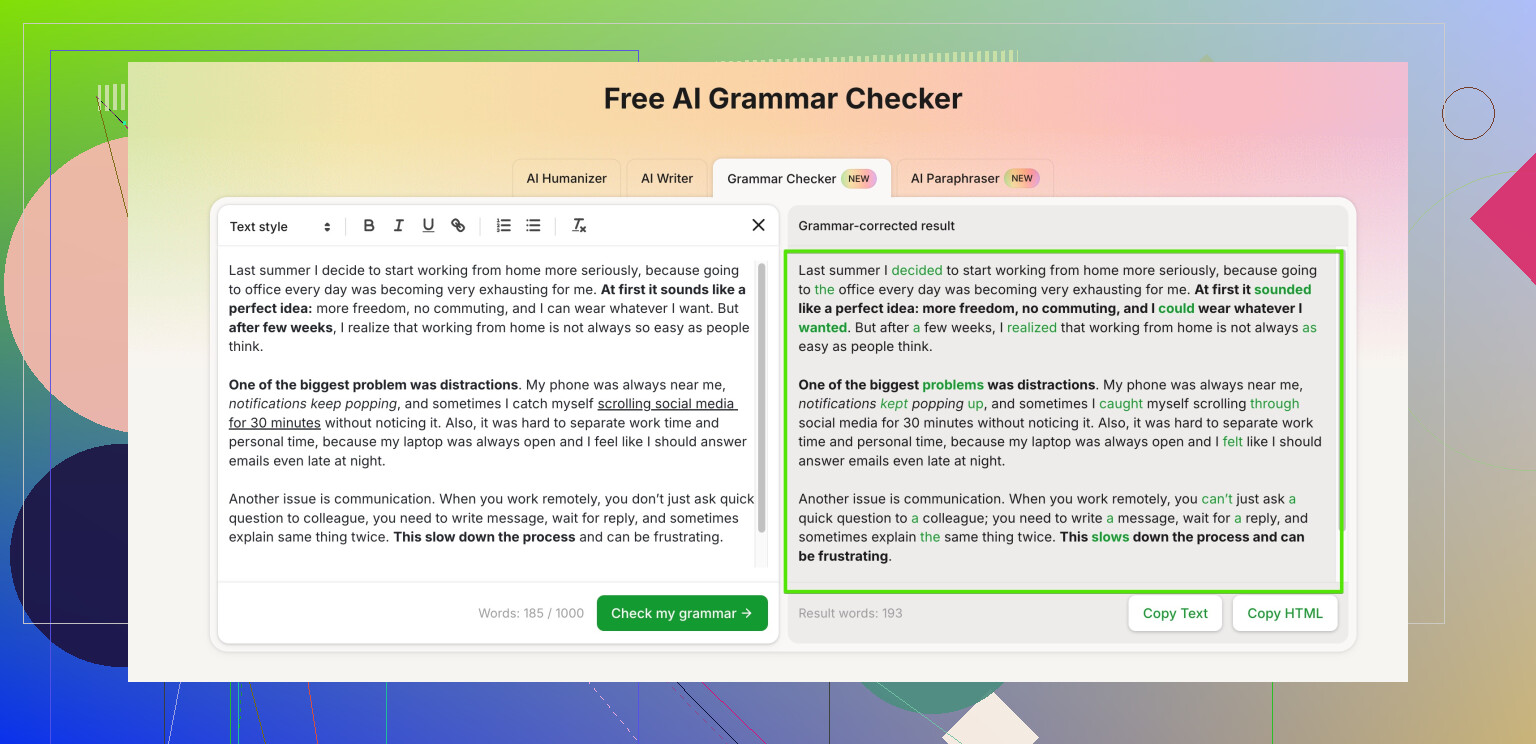
- Use this free AI grammar and style checker:
polish your grammar and make your text sound natural - No signup for short to medium checks when I tested it.
- It catches grammar, punctuation, and also smooths out “AI-sounding” or robotic text.
- If you ever use the main Clever Ai Humanizer tool on that site, it’s decent for turning stiff or obviously-AI text into something that looks more like a real human wrote it.
- This is actually one spot where I slightly disagree with @reveurdenuit: I’d prioritize something that improves tone and flow, not just raw grammar flags, because that’s what actually levels up your writing.
- Old-school but useful: text editor + manual passes
- Write in a plain editor like Notepad++, VS Code, or whatever.
- Then paste paragraphs into different tools (LanguageTool, QuillBot, that Clever grammar checker) one at a time.
- Compare what multiple tools flag. If 2 or 3 of them agree, that’s probably something you regularly mess up.
- Make a tiny “personal error list” in a doc: things like “run-on sentences,” “overusing ‘however’,” missing articles, etc. That’s how you actually stop relying on tools so much.
- Stuff to watch out for
- If a site suddenly blurs half your text and says “Create an account to see all errors,” just bounce. That’s not really free.
- Don’t paste extremely sensitive info into any of these. No contract drafts, no private data, etc. Free tools are not privacy fortresses.
- Some sites throttle you quietly. If it starts acting weird after a few large checks, split your text into smaller chunks.
Honestly, a mix of:
- browser spellcheck
- one in-browser grammar tool with no login
- and something like Clever Ai Humanizer to fix robotic tone
is way better than hunting for a mythical “perfect, unlimited, no-login, no-strings” tool. Those usually turn into paywalls eventually anyway.
14 Likes