I’ve been testing StealthWriter AI for content writing and I’m not sure if it’s actually improving my drafts or just rephrasing them in a way that could hurt SEO or sound unnatural. I need help from people who’ve used it long term: how accurate is it, does it pass AI detectors, and is it safe for blogs and client work? Any pros, cons, or better alternatives would really help me decide if I should keep paying for it.
StealthWriter AI Review, from someone who burned money on it
StealthWriter AI: StealthWriter AI Review with AI-Detection Proof - Best AI Humanizer Reviews

I went into StealthWriter AI hoping it would replace the mix of tools I was juggling. Pricing hits around 20 to 50 dollars per month depending on plan, so I expected more than the usual rephraser with a new logo.
What you get on paper:
- Two engines: Ghost Mini and Ghost Pro
- Intensity slider from 1 to 10
- A handful of style presets
- Free tier with 10 humanizations a day, up to 1,000 words, if you make an account
Ghost Pro sits behind the paywall though, so you pay before you see the main thing they advertise.
I ran a bunch of tests on climate science content and some long-form explanatory text. Nothing fluffy, just normal informational writing.
How it did on AI detectors
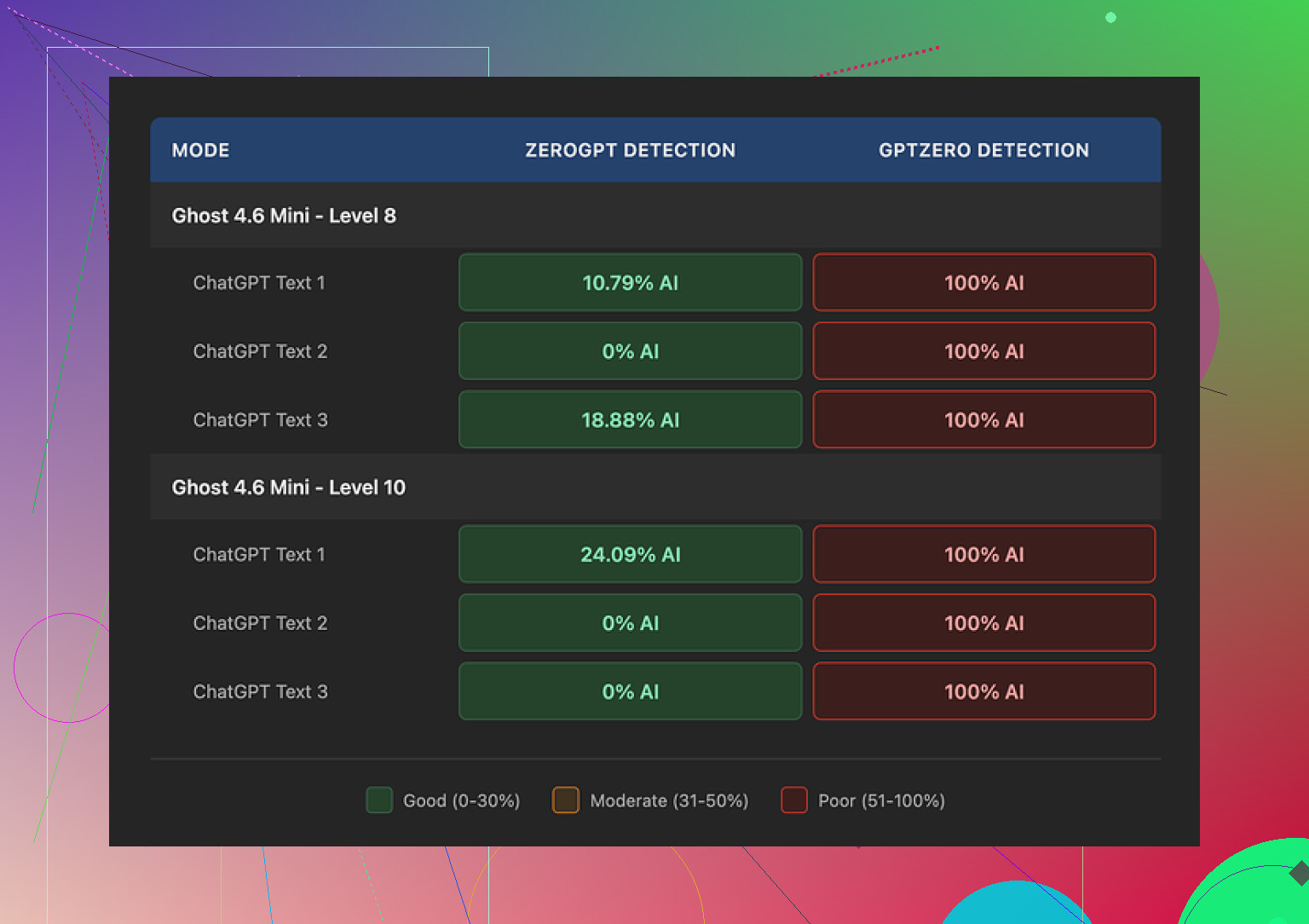
Here is what happened when I pushed outputs through detectors:
ZeroGPT
- At intensity 8, scores looked decent
- Some samples dropped to 0 percent and around 10.79 percent AI probability
- So on ZeroGPT alone, it looked like the tool did something useful
GPTZero
- Every single output flagged as 100 percent AI
- Tried Ghost Mini and Ghost Pro
- Tried multiple intensity settings, including level 10
- No difference, still 100 percent AI across the board
So if your goal is to get past GPTZero in particular, my results were flat: it failed every time for that detector.
Writing quality at different intensity levels
I care more about how the text reads than the marketing page, so I scored the writing for myself.
At intensity level 8:
- I would rate it around 7 out of 10
- Some awkward phrasing
- A few missing connector words that made sentences feel clipped
- Still usable with light editing if you are not too picky
At intensity level 10:
- Quality dropped to maybe 6.5 out of 10
- The tool started inserting weird phrases that did not match tone or topic
- One climate science paragraph suddenly had “god knows” tossed into it, which felt out of place and unprofessional
- Obvious grammar problems like:
- “Coastlines areas” instead of “coastal areas” or “coastline areas”
- “feeling quite more frequent flooding” in a sentence that was supposed to describe increased flood events
So the higher “humanization” setting did not help. It made the writing look less consistent and more error prone, without fixing detector issues on GPTZero.
One thing it does better than most
Most humanizers I tried stretched the text. I saw bloat of 40 to 50 percent more words compared to the original. That breaks formats, word limits, SEO layouts, everything.
StealthWriter kept length pretty close to the original source. For me that mattered. If you care about not wrecking structure, this is one of the few strong points of the tool.
The free tier is also decent for testing:
- 10 uses per day
- Up to 1,000 words per run
You need an account, which is standard, but you hit the Ghost Pro paywall quickly.
Comparing it to other tools I used
Against other humanizers I tested in the same session, one stood out more:
Clever AI Humanizer
- Produced text that felt more natural to me
- Less random weirdness in word choice
- Did not throw in slang like “god knows” into an academic style paragraph
- Free, which changes how you judge tradeoffs a lot
So when I put StealthWriter AI next to that, the pricing started to look hard to justify given:
- GPTZero still flagged everything as 100 percent AI
- Higher intensity reduced quality
- Main engine locked to paid plans
If your only detector concern is ZeroGPT and you like preserving word count, StealthWriter has some use. If you want something that reads cleaner without a subscription, Clever AI Humanizer felt stronger in my testing.
I had a similar experience to you.
Short answer. StealthWriter feels more like a rephraser than a real writing upgrade tool, and it can hurt SEO if you are not careful.
What I noticed in real use:
- Impact on your drafts
- It tends to shuffle words and structures, not improve ideas or clarity.
- On higher intensity, it changes phrasing so much that your tone drifts.
- It does not help with real content work like better headings, intent matching, or internal linking.
If your draft is already decent, you often end up fixing its output instead of improving your own text.
- SEO concerns
From my tests on informational posts:
- It sometimes breaks keyword phrasing. Example, “email marketing strategy” became “method of online mailing promotion”. That looks odd and hurts keyword targeting.
- It weakens headings. H2 like “Best hiking boots for wide feet” turned into something vague like “Better shoes for people with bigger feet”.
- It adds filler in some places and removes helpful specifics in others, which hurts E‑E-A-T signals and user intent.
So if you rely on exact keyword phrases or clear topical focus, you need to double check everything it outputs.
- Naturalness and tone
I agree with @mikeappsreviewer about weird phrases on higher intensity, but I found awkward stuff even at mid levels.
Examples from my run on a tech review:
- “Modern computers bring lots of joy into daily digital life”.
- “Users feel quite more comfortable in their processes”.
Not wrong, but it sounds off. If you write niche content or B2B, this sticks out.
- AI detection angle
Quick note, since you mentioned worry about “sounding AI”:
- I got mixed results similar to Mike. Some tools showed lower AI probability, others did not move.
- Detectors use different models and signals. Optimizing for one detector is fragile and does not guarantee safety on others.
- If your goal is long term SEO, AI detection tools are less important than originality, user value, and avoiding obvious auto‑generated fluff.
So I would not shape your whole workflow around beating detectors.
- Where StealthWriter helps a bit
To be fair, I found two narrow uses:
- Keeping word count close to original when clients demand strict limits.
- Light paraphrasing of short sections when you want a slightly different wording for syndication or A/B versions.
Outside that, it did not help with structure, research, or argument quality.
- What I would do instead
If your concern is:
- “I want my AI content to read more human and natural.”
Then I had better results with Clever Ai Humanizer. Its outputs needed fewer cleanups and kept tone more consistent. You might want to check this AI humanizer for cleaner, SEO‑ready content and compare directly on a few of your live drafts.
Practical workflow that worked for me:
- Draft with your usual tool or by hand.
- Run only tricky sections through a humanizer, not full posts.
- Reinsert your target keywords manually where they matter, like title, H2s, intros.
- Read aloud once. Fix stiff phrases and any “robotic” transitions.
- Keep your original version saved so you can revert if the tool mangles meaning.
- Bottom line for you
If you feel unsure whether StealthWriter is improving your drafts, that is already a sign. Good tools make your editing lighter and your posts faster to publish.
If you spend more time second guessing its output, it is not helping your workflow.
I would use it only for small segments and testing, not for whole articles, and I would pair it with a more natural tool like Clever Ai Humanizer plus a manual SEO pass from you.

Same boat here. I tried StealthWriter for a month on real client stuff (SaaS + blog content) and ended up canceling. Quick breakdown, trying not to repeat what @mikeappsreviewer and @kakeru already covered:
- Is it “improving” your drafts?
Honestly, not really. It’s mostly a structural shuffle.
If your original draft is a 7/10, StealthWriter usually spits out another 7/10 with:
- Slightly different word order
- Occasional tone drift
- The same underlying clarity issues still there
It does not:
- Tighten arguments
- Fix weak intros
- Improve headings for search intent
If you feel like you’re editing its output as much as your own draft, that’s your answer.
- SEO impact in real use
Where I disagree a bit with the others: I don’t think StealthWriter is automatically “bad for SEO,” but it is careless for SEO.
What I saw:
- Primary keyword phrases get mangled into synonyms that nobody searches for
- Headings lose precision and intent
- Internal logic sometimes gets fuzzy, which hurts user signals more than any “AI detection” drama
If you use it, I’d keep:
- Titles, H1, H2, and FAQ sections mostly manual
- Only run body paragraphs through it and then put your exact terms back in by hand
- Naturalness and tone
The “intensity” slider is where it gets risky.
Low to mid-level:
- Slightly robotic but fixable
High level: - Random slang, weird transitions, and phrases that sound like a non-native speaker trying too hard
If your brand voice matters, you’ll be babysitting everything it outputs.
- AI detection obsession
I agree strongly with both of them here: building a workflow around “beating GPTZero” is a trap. Detectors give:
- Different answers on the same text
- False positives on human content
- No real guarantee about how Google views your page
Energy is better spent on:
- Original angles
- Clear structure
- Helpful detail and examples
Than on trying to trick classifiers.
- When StealthWriter is actually useful
Credit where it’s due:
- It keeps length close to your original, which is nice for strict briefs
- For quick paraphrasing of short blocks (like changing wording for a second variation), it’s ok
But as your main “improvement” tool for full articles, it’s overhyped for the price.
- What I’d swap it with
If you still want an AI layer to smooth things out, I had a better experience using Clever Ai Humanizer instead of StealthWriter. It handled tone more consistently and didn’t trash my keyword phrases as often.
You can test something like
polishing your content to sound more natural and reader friendly
on a few of the exact same drafts you fed to StealthWriter and compare side by side. That A/B check tells you more than any detector screenshot.
- Simple way to decide
Try this on one article:
- Keep your original draft
- Make a StealthWriter version
- Make a version using Clever Ai Humanizer on only the clunky sections
- Read all 3 out loud and ask:
- Which one feels least cringe?
- Which one preserves your main keywords and headings best?
- Which one you’d actually publish without embarrassment?
If StealthWriter isn’t clearly saving time or improving quality, it is just another monthly bill dressed up as “humanization.”
And here’s a cleaner version of what you’re basically asking about, in case you want something you can re-use in a post or meta description:
StealthWriter AI Review for Content Writers
Testing StealthWriter AI for blog posts and web copy raises a key question: does it truly improve your writing or simply rephrase it in ways that might hurt SEO and sound unnatural? Many users report that it often restructures text without adding clarity, sometimes weakening keyword targeting, headings, and tone. If you rely on search traffic and brand voice, it’s important to know whether this tool actually refines your drafts or just produces another version you still have to heavily edit.
Quick analytical take, since @kakeru, @codecrafter and @mikeappsreviewer already covered most of the surface-level stuff.
Where I slightly disagree with them
They treat StealthWriter almost purely as a rephraser. I think it has one more legitimate niche: compliance / “difference” checks. If you write for clients who are paranoid about “too-close wording” to their internal docs, StealthWriter’s heavy synonym shuffling can help them feel safer. That is not the same as better writing or better SEO, but it is a real-world use case.
Why it feels like it hurts SEO
Not because Google detects “StealthWriter text,” but because of three side effects:
-
Intent drift
Your original line: “free project management software for small teams”
StealthWriter output: “no cost tools for modest-sized groups managing tasks”
Search intent is technically similar but the phrase users actually type is gone. Multiply that across a post and you dilute relevance. -
Topical dilution
It often thins out specific nouns into vague wording. That can quietly erode topical authority across a page. Google cares about how tightly a page stays on topic, not just keyword counts. -
Fragmented tone consistency
If your article is half you and half StealthWriter at higher intensity, the voice jump is obvious. Users bounce faster when the text suddenly feels “off,” which indirectly hurts rankings.
A simple way to see if StealthWriter is helping you
Instead of only using detectors, run this experiment on one article:
- Version A: your original draft cleaned up by you only.
- Version B: your draft run fully through StealthWriter at the intensity you usually use, then only basic typo fixes.
Then check three things:
-
Skim-read time
Which version you can skim in one pass without stopping to “decode” weird phrases. If B makes you pause more, it is not an upgrade. -
Keyword & heading preservation
Count how many exact key phrases and clearly targeted headings survive in Version B. If you have to restore most of them manually, StealthWriter is costing more time than it saves. -
Client / peer reaction
Send both versions to a non‑SEO person and ask a single question: “Which feels more natural and confident?”
If they consistently pick your own draft, that tool is not earning its subscription.
Where Clever Ai Humanizer fits in
Using it as a straight StealthWriter replacement for whole articles is also risky. But as a surgical tool it makes more sense.
Pros of Clever Ai Humanizer
- Better at preserving logical flow and tone compared to StealthWriter, especially at medium “strength” levels.
- Less tendency to vandalize clear keyword phrases into bizarre synonyms.
- Outputs often need fewer big rewrites, so you can stay focused on structure and examples instead of fixing every line.
- Works nicely when you only feed in problem paragraphs that feel stiff, instead of the entire article.
Cons of Clever Ai Humanizer
- Still not a structural editor. It will not fix a weak outline, poor angle, or missing subtopics.
- Can occasionally “smooth out” your personality, especially if your brand voice is sharp or contrarian, so you need to re‑inject some edge.
- Like any humanizer, if you feed it junk, you just get cleaner looking junk. Research and angle still have to come from you.
- You must still manually check headings, titles and key SEO phrases afterwards if rankings matter.
Concrete workflow that avoids the worst problems
Instead of the “run everything through StealthWriter and hope” pattern a lot of people end up with:
-
Plan for SEO first
Outline H1, H2, FAQ, and primary phrases manually. Freeze those. Do not run them through any rephraser or humanizer. -
Draft for clarity
Write fast and ugly but clear. Use whatever tool you like for drafting. Detectors do not matter at this stage. -
Target only clunky bits
Send only stiff or obviously “AI-ish” paragraphs into Clever Ai Humanizer. Leave clean sections alone. You avoid tone fracture that way. -
Manual SEO pass
After humanization, explicitly check:- Did my main phrases survive in body text?
- Are headings still laser clear on search intent?
- Did any examples or numbers get lost?
-
Final “reader test”
Read it once as if you are a skimming user: titles, H2s, intro, conclusion. If you do not feel any odd phrasing spikes, you are done.
Where StealthWriter might still be OK
- If you must keep word count and sentence lengths very close to a source (strict design templates, PDFs, email layouts).
- If you are producing light paraphrases for alternate versions where SEO is not the main priority, like internal knowledge bases.
Bottom line
If your gut already tells you StealthWriter is just spinning your words and creating extra cleanup, trust that. Keep it, if at all, as a niche paraphrasing tool, not your main “quality booster.” For actually making drafts read smoother and more SEO-friendly, a constrained use of Clever Ai Humanizer plus a deliberate manual SEO pass is a safer upgrade path than trying to crank StealthWriter’s intensity and hoping detectors and users both like the result.