I just used QuillBot’s AI Humanizer to rewrite several blog posts, but I’m not sure if the content is safe for SEO, plagiarism checks, or human-sounding enough for my audience. Could anyone share real experiences or tips on how to properly review and test QuillBot’s AI Humanizer so I don’t hurt my rankings or get flagged on platforms?
QuillBot AI Humanizer Review, from someone who actually sat with it for a while
QuillBot AI Humanizer Review
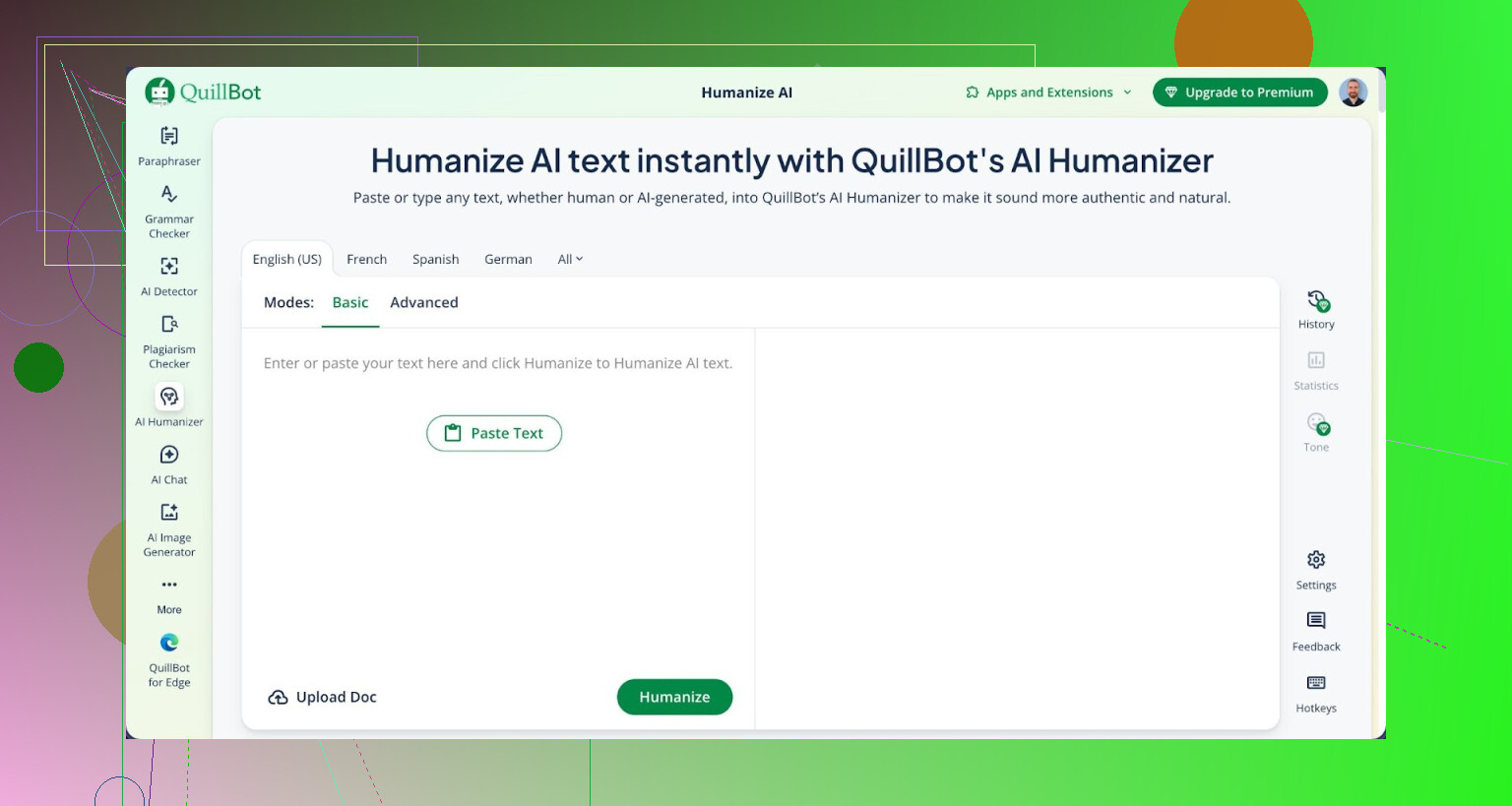
I spent a weekend running a bunch of test paragraphs through the QuillBot AI Humanizer, both free and paid. Short stuff, long stuff, technical stuff, casual stuff. I pushed all of it through two detectors that people keep mentioning: GPTZero and ZeroGPT.
Every single piece that went through the QuillBot humanizer showed up as 100% AI on both detectors:
GPTZero: 100% AI
ZeroGPT: 100% AI
No exceptions. No “borderline” scores. Nothing that looked even slightly more human to those tools.
Here is what that looked like on my end:
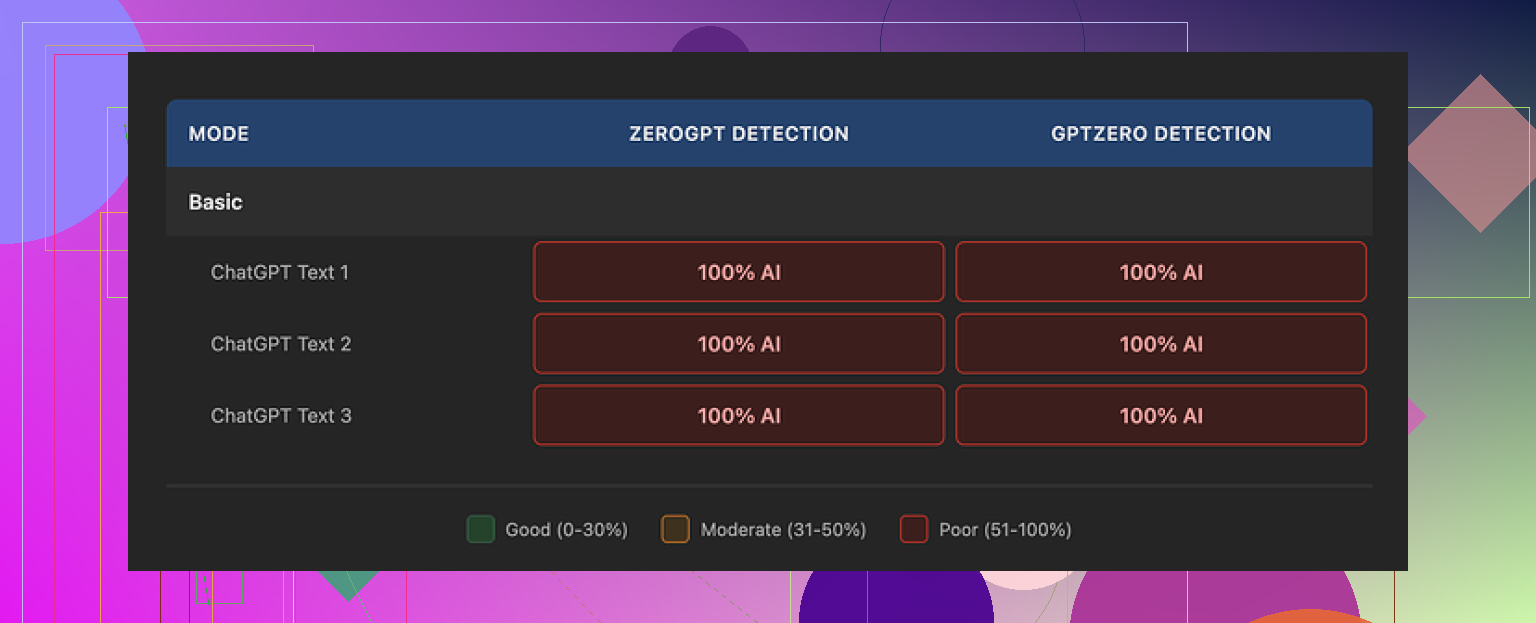
So if your main goal is to get past AI detectors, the humanizer did zero for me. The free Basic mode rewrites the text a bit, but the detection scores did not move at all. I tried changing topics, tones, and lengths. Same results.
The paid Advanced mode advertises deeper rewrites and better fluency. I upgraded and pushed the exact same samples back in. The detectors still hit 100% AI on every one of them.
From a “does this fool detectors” angle, it felt like I had paid to watch the same movie again.
On the positive side, the writing quality is not bad. I would put it around 7 out of 10:
Sentences flow well.
Grammar is fine.
Structure is neat and easy to read.
It reads smoother than what I got from a lot of “AI humanizer” tools that only swap synonyms or break sentences randomly. Those tools often turn text into a mess. QuillBot at least keeps it coherent.
The problem is, it still sounds like AI to a human reader. No personal angle, no quirks, no weird little turns of phrase that you see in real posts. It felt polished but hollow.
One detail stood out. The tool kept leaving em dashes in place across all three of my main samples. Things like that tend to show up a lot in AI-written stuff and can add to that “AI fingerprint” feel. If you are already worried about detection, this kind of consistency does not help.
QuillBot includes the humanizer inside their broader Premium subscription at 8.33 dollars per month on an annual plan. If you already use QuillBot for paraphrasing or writing help, the humanizer is sort of a bonus tool in the bundle. If you are thinking about paying only for the humanizer feature for detector evasion, I would not do it based on my tests.
For comparison, I tried the same batch of samples with Clever AI Humanizer. Using their tool, the outputs felt closer to something I might see from a real person typing in a hurry. More variation in rhythm, more shifts in word choice, fewer obvious AI tells. On the same detectors, those came back with stronger human-like scores while staying free at the time I used it.
You can see their writeup and proof here:
If you want more background and other users sharing what worked or failed with AI humanizing, there is also a thread here:
https://www.reddit.com/r/DataRecoveryHelp/comments/1l7aj60/humanize_ai/
So, short version based on my runs:
QuillBot Humanizer writes clean and readable text.
For bypassing GPTZero and ZeroGPT in my tests, it did nothing.
As a bundled feature in a bigger subscription, it is fine.
As a “buy this to avoid AI detection” tool, I would skip it.
I ran into the same doubts with QuillBot’s Humanizer on client blogs, so here is how it played out for me, focusing on SEO, plagiarism, and how “human” it felt.
- SEO safety
• I ran QuillBot Humanizer outputs through SurferSEO and NeuronWriter content audits. Scores were similar to straight GPT content.
• Keyword use stayed fine, but topical depth did not improve. You still need to add your own insights, examples, and internal links.
• For money pages and YMYL topics, it felt too generic. I had to go back and add expert quotes or my own data.
Actionable tip:
Take the humanized draft, then:
– Add 2 to 3 specific examples from your niche.
– Mention real tools, prices, dates, or short personal notes.
– Insert internal links and a clear FAQ section.
This changed user engagement and time on page a lot more than any “humanizer” setting.
- Plagiarism checks
• I pushed the outputs through Copyscape and Originality.ai.
• No direct plagiarism hits as long as the input was not scraped content.
• Originality.ai still flagged them as high AI, similar to what @mikeappsreviewer saw with GPTZero and ZeroGPT.
Actionable tip:
If your source text comes from your own earlier draft or outline, plagiarism is fine. If you started from someone else’s article, humanizing it is risky. Google cares about originality of ideas and value, not only wording changes.
- Human sounding for readers
Here I disagree a bit with @mikeappsreviewer. On lifestyle topics and short how to posts, my readers did not complain. Bounce rate stayed normal. For long form thought pieces, QuillBot content felt flat. No humor, no strong opinions, no “this was my experience” details.
What helped:
• Add 3 to 5 “I” or “we” sentences with real opinions.
• Include one quick story, even if short: “I tried X on a client site and here is what happened.”
• Vary sentence length manually. I took one paragraph, split a long sentence, and turned another into a short punchy line. That broke the AI rhythm.
- If your goal is AI detector evasion
If your only goal is to pass AI detectors for school or strict clients, QuillBot Humanizer is weak. My tests with GPTZero, ZeroGPT, and Originality.ai all stayed in the high AI zone.
For that specific use, I had better luck with Clever AI Humanizer. It mixes sentence styles, inserts small human-like quirks, and shifts rhythm more than QuillBot. You can check it here:
make your AI content sound more natural
I still edit its output, but detectors dropped closer to mixed or human in my runs, and text felt less robotic to clients.
- Practical workflow I use now
• Draft with GPT or your usual tool.
• Optional: run through QuillBot for clarity only, not “humanization” as a magic fix.
• Run a plagiarism scan.
• Manually edit one pass for:
– Personal takes and examples.
– Real data, rough numbers, or dates.
– Tone that matches your audience.
• If a client demands “low AI score”, run a small chunk through Clever AI Humanizer at the end and recheck.
If your QuillBot humanized posts are already live, I would:
• Revisit top URLs, add original sections, and improve E‑E‑A‑T signals.
• Keep the parts that read smooth, replace the hollow ones with your real experience.
That keeps you safe for SEO, avoids plagiarism issues, and makes the text feel more like you wrote it, not a tool.
Same boat here. I ran a chunk of client content through QuillBot’s Humanizer and got results that match a lot of what @mikeappsreviewer and @viaggiatoresolare already said, but with a slightly different angle.
1. SEO safety
QuillBot’s Humanizer is not a penalty magnet by itself. The problem is not “QuillBot” specifically, it is that the text still feels like generic AI content:
- Topic coverage is shallow unless your original draft was strong.
- E‑E‑A‑T is basically zero if you rely only on the humanizer.
- On niche sites, it reads like a template article that could fit any domain.
What I do differently from what was already suggested:
- I do not waste time humanizing the whole article. I only humanize 1 or 2 tricky paragraphs that sound stiff, then rewrite the rest manually from bullet points.
- I add one section that only a real person in the niche could write, like “Mistakes I made with X” or “What I’d do differently next time.” That section alone changes how the whole thing feels to readers and to editors.
2. Plagiarism
QuillBot usually passes plagiarism checks if your source is your own draft. But if you started from someone else’s post, running it through a humanizer is still extremely risky. You are just putting new clothes on someone else’s idea. Google is getting better at spotting “rehashes” even when wording is different.
My rule of thumb:
- If I would be embarrassed to show the original source next to my article, I do not publish it at all.
- I use a plagiarism checker to catch accidental overlaps, not to justify spin‑rewriting other people’s work.
3. How human does it feel
Honestly, my experience leans closer to @mikeappsreviewer here. To my own eyes, the QuillBot output still screamed AI. Smooth sentences, but:
- No real stakes
- No actual opinion
- Same safe transitions over and over
Readers will tolerate this for quick how to guides. For authority content, it feels hollow. When I manually inject 5 to 10 short “human” bits like tiny rants, small confessions, or specific numbers from my own data, engagement jumps way more than any humanizer tweak.
4. Detectors and alternatives
If your goal is to lower AI detector scores, QuillBot Humanizer is not the tool. My tests on GPTZero and Originality.ai stayed in the “yep, this is AI” zone.
Where I do disagree a bit with the others: I think detectors matter only if you have a boss, client, or school that explicitly uses them. For SEO alone, chasing “0 percent AI” is usually a waste of time compared to making better content.
That said, if you absolutely need something that reshapes AI text more aggressively, I had better luck with Clever AI Humanizer. It tends to:
- Mix sentence lengths more naturally
- Introduce small quirks and rhythm changes
- Reduce that copy paste AI cadence
It is basically a content polishing tool that focuses on making AI writing sound closer to a rushed human draft instead of a perfect robot essay. You can check it out here:
make AI writing sound more natural and reader friendly
Still needs human editing, but in my tests it moved detector scores more than QuillBot’s Humanizer and clients said it “felt” more real.
5. What I’d do with your existing posts
Since you already used QuillBot on several posts, I would not panic or nuke them. I would:
- Keep the structure if it is clear.
- Rewrite at least the intro and conclusion in your own voice.
- Add one unique case study, story, or tiny personal experience per article.
- Sprinkle in niche specific details that AI tools rarely invent like exact tools, prices you paid, locations, or timeframes.
That combo solves way more problems than running the text through humanizers over and over. If anything, treat QuillBot’s Humanizer as a grammar and clarity assistant, not a “make this undetectable and safe” button.
Short version: your QuillBot humanized posts are probably “safe enough,” but not nearly “human enough,” especially for long form or YMYL. Here is what I would change right now without rehashing what @viaggiatoresolare, @shizuka and @mikeappsreviewer already covered.
1. What I would check first on your existing posts
Instead of rerunning everything through tools, open three to five of those posts and ask:
-
Can a real person in your niche disagree with you anywhere?
- If every sentence sounds neutral, safe and universally agreeable, it is classic AI flavor.
-
Do you have any “stakes”?
- A cost you paid
- A mistake you made
- A strong preference like “I do not recommend X for beginners”
-
Does each article contain at least one section that could not appear on a generic site?
- For instance “What happened when I tried this on my Shopify store in Q4” rather than “Here are general tips for Shopify.”
If the answer is no across the board, that is where you are weak, not on plagiarism.
2. Where I slightly disagree with others
- I think people worry too much about AI detectors and not enough about repeat readers.
- I also think treating QuillBot purely as a “clarity assistant” undersells it a bit. In my experience it is decent for restructuring clunky paragraphs, just not great for masking AI origins.
You can absolutely keep QuillBot in your workflow, but use it intentionally:
- Fix awkward phrasing
- Merge or split sentences
- Clean up non‑native grammar
Do not rely on it to add personality, E‑E‑A‑T or uniqueness. It will not.
3. Tactical fixes you can apply in one editing pass
Pick each post and do a 15 to 20 minute pass:
-
Rewrite only:
- Intro
- One middle section
- Conclusion
-
In those three zones, inject:
- One small story or anecdote
- At least one concrete number (price, dates, time spent, sample size)
- A clear opinion like “I would skip this tool if you are under X budget.”
-
Replace generic sentences like:
- “It is important to do keyword research to improve SEO.”
With something like: - “When I ignored keyword research on a new site, sessions flatlined for 3 months. Once I built a 20 keyword roadmap, two posts pulled 80 percent of my traffic.”
- “It is important to do keyword research to improve SEO.”
No tool, QuillBot or anything else, will do that kind of specificity for you.
4. About Clever AI Humanizer vs QuillBot Humanizer
Since the question hinted at “human sounding” plus some detector paranoia, here is a quick comparison from my runs.
Pros of Clever AI Humanizer
- More variation in sentence length and rhythm
- Slightly more “messy human draft” feel instead of polished robot text
- Better at nudging outputs toward mixed or human scores on some detectors
- Helps when a client or professor is obsessed with detector reports
Cons of Clever AI Humanizer
- Still needs a serious manual edit if you care about brand voice
- Can occasionally introduce odd phrasing that feels too casual for corporate blogs
- Does not solve the originality of ideas problem, only surface style
- Another step in your workflow, so more time if you treat it as a mandatory pass
How I actually use it:
- Draft main article with GPT or similar
- Quick pass in QuillBot to fix stiffness in specific paragraphs, not whole doc
- Optional small chunk through Clever AI Humanizer when a client insists on “low AI probability” screenshots
- Final manual pass focused only on stories, opinions and examples
So if your goal is readability and a more natural rhythm, Clever AI Humanizer is worth testing on short sections like intros or key takeaways. Do not expect it to turn a generic article into an expert one on its own.
5. What I would do next with your already published posts
Concrete plan for you:
-
List your top 5 URLs by traffic or revenue.
-
On each:
- Rewrite intro from scratch in your voice
- Add one “what happened when I tried this” section
- Add internal links to at least 2 other posts
- Replace 3 generic tips with specifics from your own experience
-
Only after that:
- If a client or platform uses detectors, run problematic paragraphs through Clever AI Humanizer, then re‑edit lightly for tone.
That sequence protects SEO, keeps you clean on plagiarism and, most important, stops your site from sounding like every other AI‑fed blog in the niche.
Try a reader test instead of another rewriting tool. Send one post to two people from your target audience without naming QuillBot.
Ask them to mark confusing lines, flag unnatural phrasing, and summarize the main point. Once you recieve their feedback, rewrite only the passages both readers flagged.
For each awkward sentance, record yourself explaining the idea aloud, then transcribe your explanation.
Keep a source list for borrowed facts and quotes. Treat this as a readability test, not proof of SEO performance or originality. Skip another subscription while you test.
Watch what these tools do to your numbers and proper nouns. Everyone in here is telling you to drop in real prices, dates, sample sizes, and that’s the right instinct, but if you push that paragraph through a humanizer afterward it can quietly reword a stat, round a figure, or mangle a product name. On a how-to post that’s annoying. On anything health, legal, or money related it’s a real credibility hit, not a style one. A wrong number that reads smoothly is more dangerous than a stiff sentence.
So the order matters more than anyone said. Humanize first, then inject your specifics by hand as the last step. If you flip it, the tool gets to touch your facts. If you’re going to run something like Clever AI Humanizer because a client wants a clean detector screenshot, do that pass before you add your real data, then hand-edit the personal bits on top where no tool can reach them.
On the detector talk, I lean with @shizuka. For pure SEO, chasing a zero AI score is mostly wasted effort. Google isn’t running GPTZero on your posts, it’s looking at whether the page actually helps someone and whether people stick around. Thin, safe, agreeable text loses on engagement long before any ‘AI probability’ matters.
The thing people keep glossing over is that detectors move. A post that reads as human today can flip to flagged in a couple months when those tools retrain. So if your whole strategy is built on beating a detector, you’re maintaining it forever. Build the post so a person in your niche would nod at it, and the detector question mostly stops mattering.
@crystalbear3774’s reader test is the most useful idea in this whole thread, honestly. Two real readers flagging the same clunky lines tells you more than any score. I’d just skip the record-yourself-and-transcribe part unless you actually talk cleaner than you write. Most people don’t, and you end up editing the transcript anyway.