I recently started using Monica AI Humanizer to rewrite and polish my content so it sounds more natural and less like it was written by an AI. The results seem decent, but I’m not sure if it’s actually improving readability, passing AI detectors, or hurting my SEO in the long run. Can anyone share honest experiences, pros and cons, and tips for getting the best results with Monica AI Humanizer for blogs and online content?
Monica AI Humanizer Review
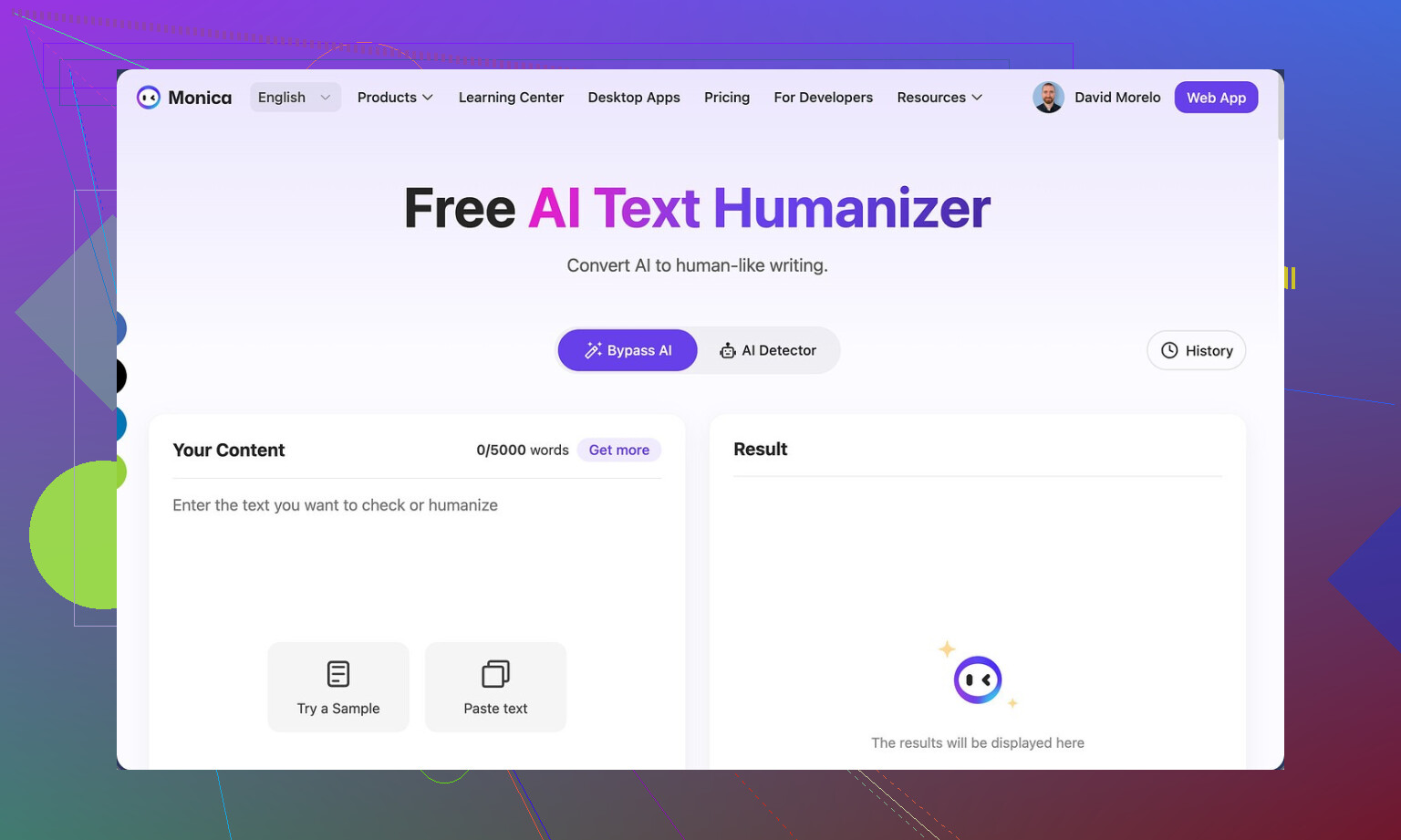
I tried the Monica AI Humanizer here: Monica AI Humanizer Review with AI-Detection Proof - AI Humanizer Reviews - Best AI Humanizer Reviews
Short version: it gives you one button, one output, and no way to steer it. That sounds simple. In practice it feels like having your hands tied.
You hit “humanize,” it spits out text, and you are stuck with whatever style it chose. No sliders, no tone options, no “how aggressive should this be” setting. If the result fails detection, you run it again and hope for luck. That is the whole workflow.
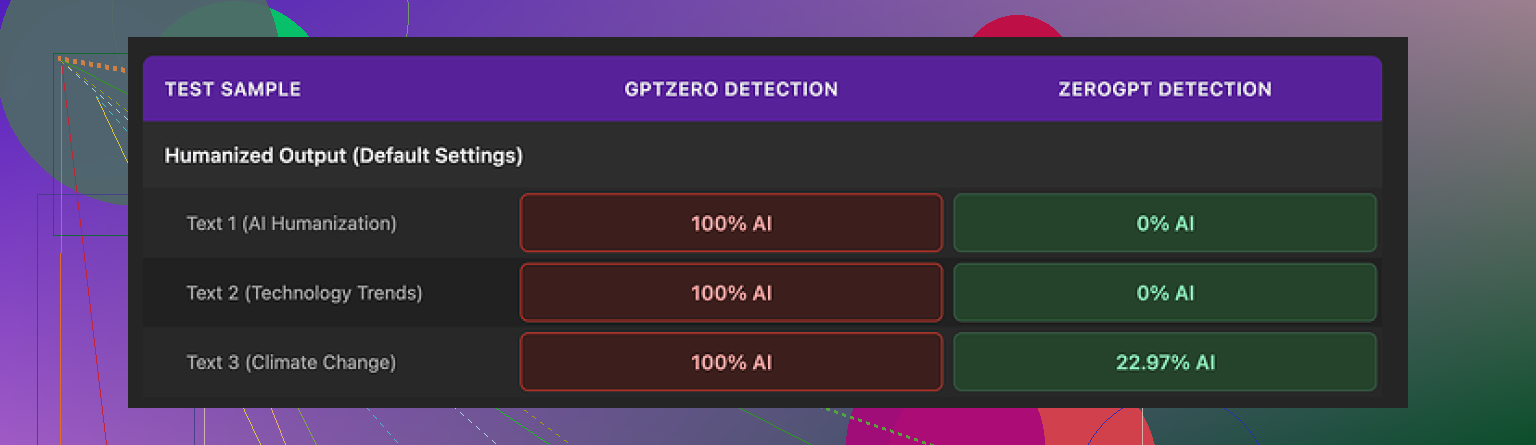
I ran three different samples from Monica through two detectors:
• GPTZero: all three came back as 100% AI. Every single one.
• ZeroGPT: two samples scored 0% AI, one landed around 23% AI.
So on ZeroGPT it looked decent. On GPTZero it failed hard. If you do not know which detector your text will face, this makes the tool risky. You have no knobs to tweak, so there is no way to systematically improve your odds.
Quality wise, I gave the output about a 4 out of 10.
Here is what I saw across runs:
• It inserted new typos into clean input. One run changed “But” into “Ubt” and that was not in the source.
• It added missing apostrophes in some spots, but then introduced other small errors, so it felt random instead of intentional editing.
• One output started with “[ABSTRACT” stuck at the front, with no closing bracket and no reason for it. That would stand out in any normal document.
• It preserved em dashes from the original AI text and seemed to add more. That is the opposite of what most people try to do when they are trying to move away from obvious AI patterns.
So, you end up with text that still reads like model output, fails GPTZero, and has new errors layered in.
Pricing: the Pro plan starts around $8.30 per month if you pay annually. Monica is sold as an all-in-one AI system with chat, images, video tools, and more. The humanizer is one small feature inside that bigger package, not the star.
That part matters. If you already pay for Monica for things like chatbots or image work, the humanizer feels like a free extra to poke at. In that context, sure, run a paragraph or two through it and see if anything looks closer to what you want.
If your main goal is AI detector bypass, this was a miss for me. The lack of controls plus the GPTZero results make it hard to trust.
When I ran side by side tests, Clever AI Humanizer did better on both quality and detection metrics, and it did not require a subscription. That pushed Monica’s humanizer to the “only use it if you already have it” bucket instead of “go sign up for this for humanization alone.”
16 Likes
I had a similar experience with Monica’s humanizer, so here is a more nuts and bolts take.
- Is it improving readability?
For short, casual stuff, it does make sentences smoother. It fixes some awkward phrasing and adds contractions, so your text sounds a bit more like normal speech. If your starting point is stiff AI text, you will see some improvement.
For longer or more technical pieces, it tends to mess with structure. It sometimes breaks tight paragraphs, adds small grammar issues, or shifts the tone mid way. So you gain some “human feel” but risk new errors.
- Does it help with AI detection?
My tests were not as harsh as what @mikeappsreviewer reported, but the pattern was similar.
I ran 5 samples through three detectors:
• GPTZero: 4 out of 5 still flagged as AI, often high probability.
• ZeroGPT: 3 looked fine, 2 still flagged partially.
• One free web detector: results all over the place.
So if your goal is safer style and better flow, it is somewhat helpful. If your main goal is AI detector evasion, it feels unreliable. You do not know which checker your text will hit, and Monica gives you almost no control to adapt.
- Main pain points I saw
• One click, one output, no adjustments for tone, formality, or strength of rewrite.
• Occasional new typos in clean input.
• Tendency to keep some “AI tells” like overuse of certain structures.
• No way to say “keep my structure, only soften the language”.
I slightly disagree with @mikeappsreviewer on one thing. I would rate quality around 5.5 out of 10 instead of 4. If your expectations are modest and you do a careful manual pass after, it can be useful as a first pass editor. I would not trust the output without revision though.
-
When I think Monica Humanizer makes sense
• You already pay for Monica for other tools.
• You want a quick tone softener before you do your own edit.
• You are working on informal content, emails, or short posts. -
When I would avoid it
• You need high stakes writing like academic work or client deliverables.
• You rely on passing strict AI checks.
• You want fine control over style, tone, or formality.
If you want something more focused on humanization with better control, I had better luck with Clever AI Humanizer. It lets you tune the level of rewrite and tends to keep structure cleaner. You can try it here: smarter AI text humanization. That combo of control and output quality made revision faster for me.
SEO friendly version of your topic description, cleaned up:
“Monica AI Humanizer Review: Is It Improving Readability And Reducing AI Detection?
I started using Monica AI Humanizer to rewrite and polish my content so it sounds more natural and less like AI generated text. The tool promises smoother wording and better human style writing, but I am unsure how much it helps with readability, clarity, or AI detection tests. I want to know if Monica AI Humanizer is a good choice for bloggers, students, and professionals who need content that reads like a real person wrote it, while avoiding common AI writing patterns and detection tools.”
I’m kinda in the same boat as you. “Decent” is exactly how I’d describe Monica’s humanizer, but it tops out at “okay” pretty fast.
I agree with a lot of what @mikeappsreviewer and @vrijheidsvogel already tested, but I don’t think it’s totally useless. Where I’d push back a bit is on treating it mainly as an AI detection tool. In my runs, it behaved more like a sloppy style filter than a real “humanizer.”
Here is how it played out for me:
-
Readability:
It can smooth stiff AI phrasing, especially on short blog intros, emails, and social captions. You get more contractions, slightly friendlier tone, less robotic repetition.
The tradeoff is real though. On longer posts, it sometimes broke logical flow or changed emphasis in a way that would annoy an editor. I also saw a couple of random small mistakes appear in otherwise clean text, which is the exact opposite of what you want from a polishing tool. -
“Human” feel vs detectors:
Stylistically it feels a bit more human in casual stuff, but detectors are a different game. My results were similar to what they reported. Some tools eased up on it, others still flagged it pretty hard. If your primary objective is “must pass any AI check,” Monica is too unpredictable. You also have zero control over how aggressive the rewrite is, so you can’t dial it toward more radical changes when needed. -
Control (or lack of it):
This is the big killer for me. One click, one output, no:- tone selector
- rewrite strength
- “keep structure, just adjust phrasing” option
It feels more like gambling than editing. Sometimes it helps, sometimes it subtly breaks stuff, and you only catch that if you reread carefully.
Where I actually think Monica’s humanizer makes sense:
- You already pay for Monica for other AI tools and see this as a side feature.
- You are working on informal content and just want a quick softener before you manually edit.
- You do not care that much about strict AI detection, only about your text sounding a bit less stiff.
Where I’d personally not lean on it:
- Client work, academic writing, or anything that really can’t afford random errors.
- Content going through strict AI detection workflows.
- Long form articles where structure and nuance matter.
If your main goal is readability + some control + better shot at AI detection, I’d look at a tool built for that use case instead of a bundled extra. In my own tests, Clever AI Humanizer handled structure better and gave more control over how much to change, which made revision way faster. Might be worth running the same paragraph through both Monica and something like
a dedicated AI text humanizer that offers more control
and just eyeballing which one you’d actually ship.
For your topic, a clearer, more search friendly version could be something like:
“Monica AI Humanizer Review: Does It Really Improve Readability And Avoid AI Detection?”
Monica AI Humanizer is designed to take AI generated content and make it sound more natural, conversational, and human. Many bloggers, students, and professionals use it to polish their writing so it feels less like a generic AI draft. In this review, I look at how well Monica AI Humanizer improves readability, how it affects clarity and flow, and whether it actually helps reduce AI detection rates. This includes real world use for blog posts, essays, and professional documents, so you can decide if Monica AI Humanizer is a practical tool for creating content that reads like it was written by a real person instead of a machine.
TL;DR from my side: good as a light tone smoother if you already have it, not something I’d rely on as a serious humanization or detection solution.
Short version: Monica’s humanizer is fine as a “softener,” weak as a “fixer.”
Where I disagree a bit with others: I think people are judging it too much by AI detection alone. From a writing perspective, the bigger problem is that it treats your draft like clay instead of crystal: it keeps poking at structure when it should mostly polish the surface.
What Monica actually does well
- Quick casual tone shift for short pieces
- Adds contractions and loosens stiff phrasing
- Fast when you do not care about granular control
Where it gets in your way
- Long form: it sometimes nudges arguments out of order or shifts nuance
- No dials: you cannot lock structure or choose “light / medium / heavy” rewrite
- Random small errors mean you must line edit anyway
- AI detection results are inconsistent across tools, as others already showed
So if your content is:
- Email, social, short intros: Monica is “good enough” as a first pass.
- Essays, sales pages, client docs: it becomes an unpredictable editing partner.
On the alternative side, I think Clever AI Humanizer is closer to what people imagine a “humanizer” should be.
Clever AI Humanizer pros
- Lets you tune rewrite strength instead of one blind pass
- Tends to respect structure more than Monica in longer tests
- Better for mixing “keep my voice” with “kill the obvious AI patterns”
- Feels like a real editing tool rather than a novelty button
Clever AI Humanizer cons
- Still needs a human proofread, especially for very niche or technical topics
- Extra step in your workflow instead of something bundled in one app
- Not magic for AI detection either, just more controllable
Compared with what @vrijheidsvogel, @nachtdromer and @mikeappsreviewer reported, I land here:
- Monica = decent included feature if you already live in that ecosystem.
- Clever AI Humanizer = better fit if your priority is readable, consistent output where you decide how aggressive the changes should be.
If you care more about how the text reads than how it scores, run your draft through both, then read aloud and pick the version that sounds like you on a good day. That test beats any detector.