I accidentally deleted important photos and videos from my SD card and stopped using it right away because I’m afraid new data could overwrite the deleted files. I need help figuring out the safest way to recover deleted files from an SD card without making things worse.
First thing I did when this happened was stop using the SD card. Do that before anything else. Pull it out of your phone, camera, drone, whatever had it mounted, and leave it alone.
Deleted photos usually are not gone on the spot. The card marks their space as free, and the file listing gets cleared. The image data often still sits there until new stuff lands on top of it. So if you keep shooting, even for one test pic, you risk wiping the old files for good.
Before you install anything, check the obvious places.
If the card was in a phone, look in Recently Deleted or Trash inside the gallery app.
If you ever plugged the card into your computer before, check the Recycle Bin.
Look through cloud sync services like Google Photos or OneDrive. I’ve seen files turn up there after people swore they never backed them up.
On your computer, turn on hidden files. Sometimes the photos are hidden by a file system glitch, and once in a while by malware.
If the files are gone from the card itself, recovery software is the route. Skip CHKDSK on Windows. Skip First Aid on macOS. Those tools repair disk structures. They are not built to recover deleted photos, and I’ve seen them make a bad card worse.
I tried a few of the free options over time.
PhotoRec works, sort of, but it feels rough. No normal interface, lots of terminal work, and the recovered files come back dumped into messy folders with generic names. Windows File Recovery felt similar. Fine if you like command line stuff. Not fun if you want speed.
Recuva is easier to click through, but I had poor luck with RAW formats. NEF and CR2 were the ones that bit me. Some files came back broken, some would not open at all.
The one I had the best results with for SD card photo recovery was Disk Drill. What sold me was how simple it was to run and how well it handled camera media. Its Advanced Camera Recovery mode did a better job with split video files and RAW photos than the lighter free tools I tested.
This is the process I’d follow:
Install Disk Drill on a Windows PC or Mac.
Connect the SD card with a dedicated card reader. I would avoid plugging in the camera by USB. A lot of cameras present storage in a way that limits low-level access.
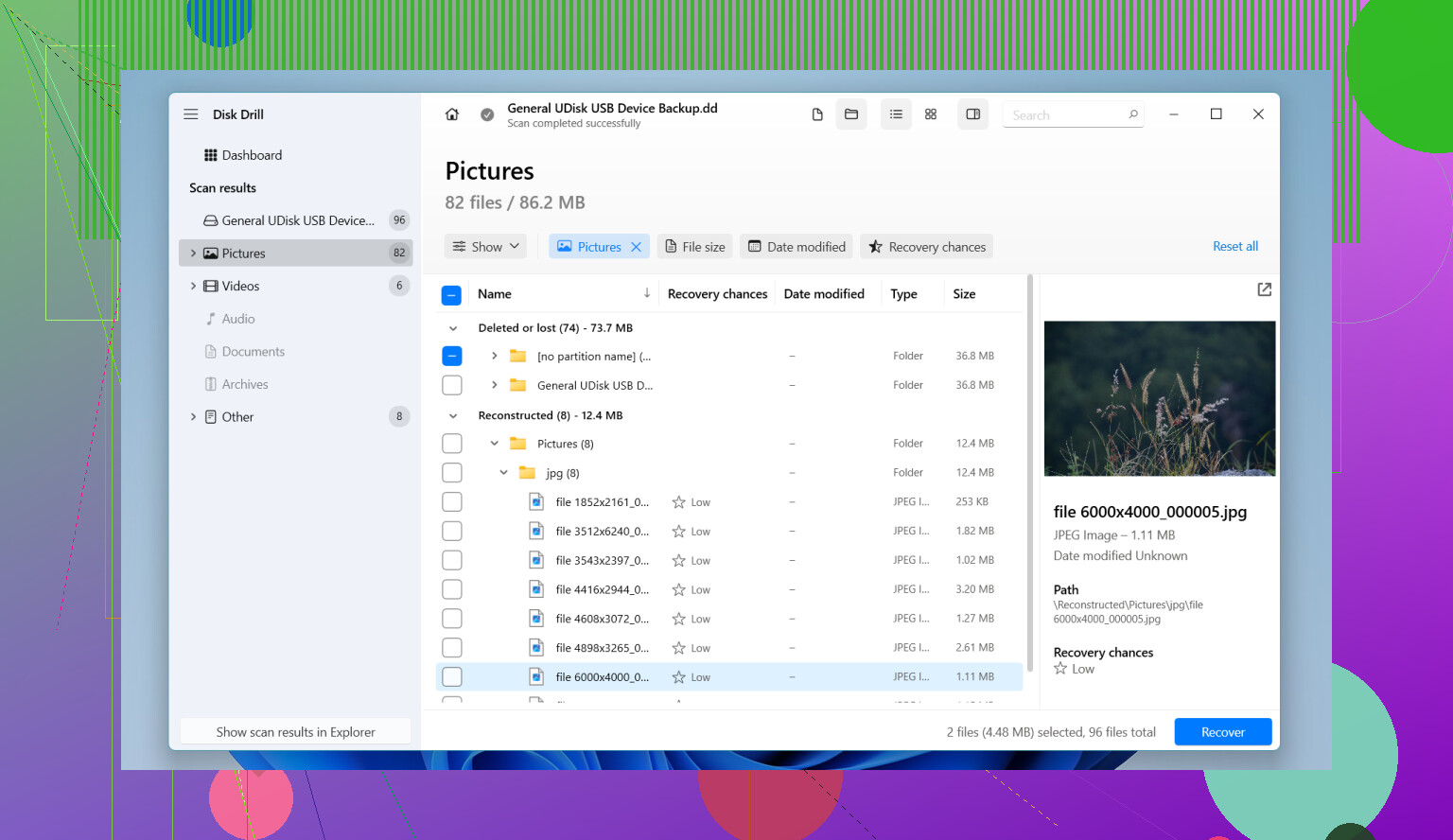
Open the program, pick the SD card from the drive list, then start a scan for lost data. If you only care about photos and videos, pick Advanced Camera Recovery.
Let the scan finish. Big cards take longer. Slow cards drag.
Preview the files it finds. This part matters. If the preview shows the full image cleanly, your odds are good and the file is usually intact.
Select what you want and recover it.
One mistake ruins the whole thing, so watch this part. When it asks where to save the recovered files, do not put them back on the same SD card. Save them to your computer’s internal drive or to another external drive. Writing recovered files onto the same card risks overwriting data you have not pulled off yet.
After you recover everything, open the files and make sure they work. Only after that would I format the SD card in the camera. If the card behaves oddly again after formatting, I’d retire it. Cards fail in weird ways, and I stopped trusting one after a scare like this.
If you haven’t taken new photos since the deletion, your chances are usually decent. That part matters more than people think.
4 Likes
Yes, if you stopped using the SD card fast, recovery odds are still decent.
I agree with @mikeappsreviewer on the big rule, do not write anything to the card. I differ a bit on one point though. I would make a byte-for-byte image of the SD card first, then scan the image, not the original card. If the card has weak sectors or starts dropping out, you get one clean shot instead of repeaated reads.
Best safe workflow:
- Lock the SD card, if it has a physical write switch.
- Use a card reader, not the phone or camera.
- Create a full image file of the card with a tool like USB Image Tool, dd, or similar.
- Run recovery on the image.
- Save recovered files to your PC or another drive only.
If you want the easy route, Disk Drill is a solid pick for this. It scans SD cards well, previews files, and keeps the process simple. Photo recovery success is highest when no new files were saved after deletion. Once blocks get overwritten, recovery drops to near zero for those files.
One more thing people miss. If the files were deleted from a camera, some videos are split across fragments. Recovery tools vary a lot there. Disk Drill tends to do better than older free tools on photo and video sets from SD cards.
If you want a fast walkthrough, this quick guide to recover deleted files from an SD card covers the process.
Do not format the card. Do not run repair tools first. And dont recover back onto the same card.
Yes, it’s possible, and stopping use immediately was the single best move.
I mostly agree with @mikeappsreviewer and @viajantedoceu, but I’m a little less convinced that everyone needs to jump straight into making a full image first. If the card is healthy and mounts normally, an image is ideal, sure, but for a lot of people that step just adds confusion and they end up doing something dumb halfway through. If the card is acting flaky, then yeah, image it first. If it’s stable, a read-only scan with a decent recovery app is often fine.
What I’d add is this: check the card’s condition before chasing files. If Windows says “scan and fix,” hit cancel. If the card is unusually slow, disconnects randomly, or shows wrong capacity, treat it like failing media. That changes the plan.
Also, deleted files are one thing. Missing files after corruption is another. Recovery odds are usually better with simple deletion than with file system damage, so don’t panic yet.
For software, Disk Drill is still one of the easier picks for SD card photo and video recovery because previews save time and help you figure out what’s actually recoverable before you write anything anywhere. Just recover to your computer, never back to the SD card. Thats the part people mess up.
One more useful read here if you want extra opinions on SD card data recovery tips and safe file recovery steps.
Short version: yes, recovery without overwriting is possible, but only if you keep the card untouched and recover files somewhere else. Once new data gets written, those old photos can be toast real fast.
Yes, very possible, but I’ll push back slightly on one thing from @voyageurdubois and @viajantedoceu: if the card is perfectly healthy, imaging first is safest, not always simplest. Some people lose momentum there. If you are non-technical, a careful read-only scan is better than fumbling with terminal commands and making a mistake.
What matters most:
- Do not write anything to the SD card
- Do not format it
- Do not run repair tools
- Do not recover files back onto the same card
A practical checkpoint people skip: if thumbnails still exist in the camera or phone, that does not mean full files are safe. Thumbnails can survive even when the original image blocks are partly overwritten.
Also, file type matters. JPEGs often recover better than large 4K videos because videos are more likely to be fragmented. That’s why results can look uneven.
If you want a simple option, Disk Drill is a reasonable pick.
Pros of Disk Drill:
- easy interface
- good preview support
- handles photos and videos well
- useful for people who do not want command-line tools
Cons of Disk Drill:
- free recovery limits depend on platform/version
- deeper scans can take a while
- not magic if data was already overwritten
- some advanced users may prefer more manual control
So I’d combine the advice from @mikeappsreviewer, @viajantedoceu, and @voyageurdubois like this: keep the card untouched, check whether it seems healthy, then either image it first or scan it directly with something like Disk Drill, and save everything to another drive only. If the card starts disconnecting or showing errors, stop and clone it before doing anything else.