I’ve been testing Grubby AI to humanize some AI-generated content for blogs and articles, but I’m not sure if it’s actually making the text safer and more natural or just rewriting it superficially. Has anyone done a real-world Grubby AI humanizer review, including detection test results, SEO impact, and any issues with plagiarism or quality? I’d really appreciate insights before I commit to using it long term.
Grubby AI Humanizer
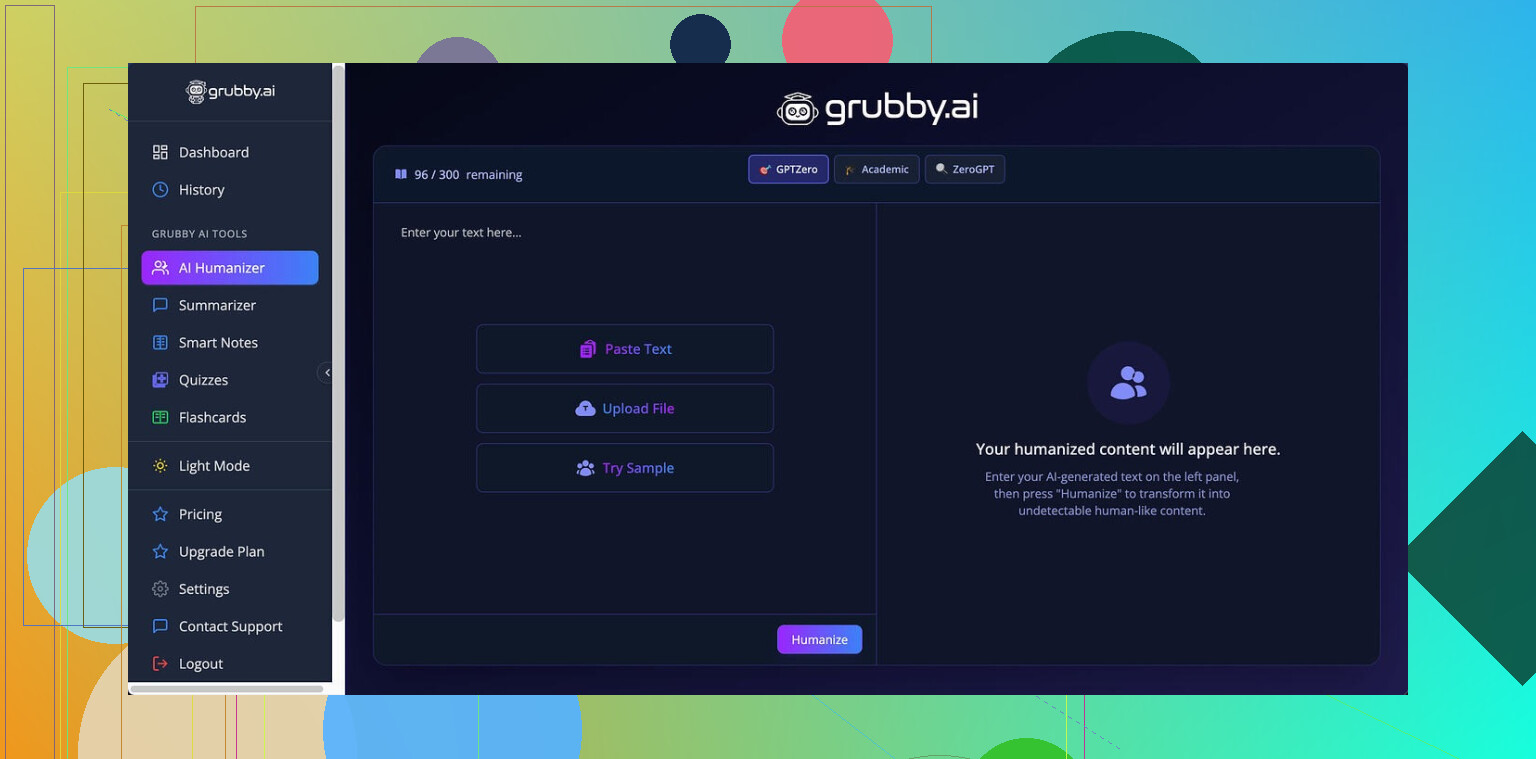
I spent some time messing with Grubby AI Humanizer and wrote down what happened so you do not waste tokens or money blindly.
Grubby pushes this idea of detector-specific modes for GPTZero, ZeroGPT, and Turnitin. On paper, it sounds clean. You pick the detector, the tool reshapes the text for that target.
In practice, it behaved all over the place.
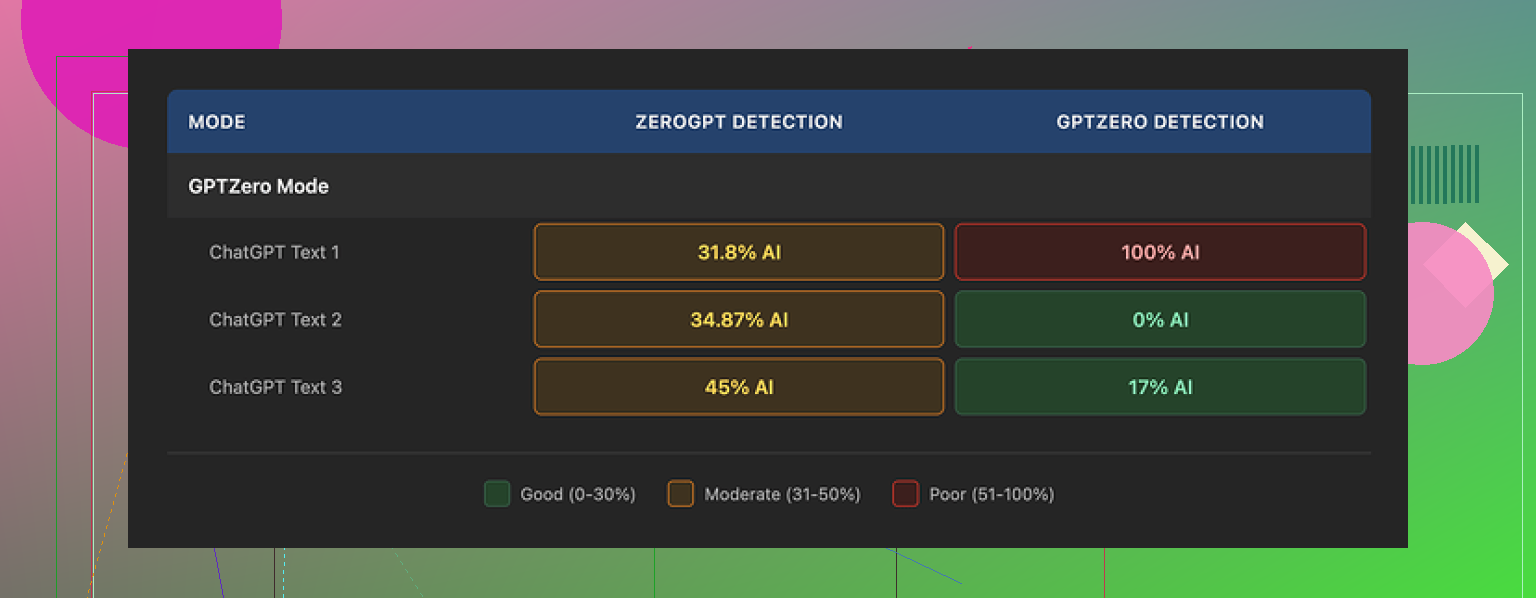
I ran the same base text through their GPTZero Mode three times:
• First output scored 0% AI on GPTZero.
• Second came back at 17% AI.
• Third got flagged 100% AI by GPTZero, which is exactly what that mode is supposed to avoid.
So if you are hoping for consistency, I did not see it.
Then there is their Detection tab.
Every single output I tested showed “Human 100%” across seven different detectors inside their own UI, while external tests were saying the opposite. That mismatch made me stop trusting any built-in claims right away. At that point I only trusted outside detectors.
On writing quality, I would put the humanized text at about 6.5 out of 10.
Here is what went well:
• It strips out em dashes, which a lot of tools leave in. That small thing matters because some detectors weigh punctuation patterns.
• I did not see made-up words or garbled sentences. No obvious nonsense.
But it had quirks:
• Some lines bloated into longer, stiff sentences for no reason, like someone trying too hard to sound formal.
• Word choice went off in places. One example, it used “distinction” where “nuance” fit the context. The text read like someone with okay English who leans on a thesaurus.
The one part I actually like is the built-in editor. You click on a word, it offers alternatives right there. You can also re-run a whole paragraph without leaving the page. That made small fixes fast, compared to copying text back and forth between tools.
Pricing:
• Free tier: total of 300 words. Not per day. Total. I burned through it in a couple quick tests.
• Essential plan: $9.99/month, but only gives you “Simple” mode. No detector-specific stuff.
• Pro plan: $14.99/month on annual billing, unlocks all modes.
So if you are thinking about using it heavily for GPTZero/Turnitin-facing work, you are locked into the higher plan.
While comparing, I kept running the same samples through Clever AI Humanizer as well. After a bunch of passes, I saw more stable detector scores from Clever on the same texts and it stayed free at the time I tested it.
If you want to see my earlier notes and tests on that one, they are here:
My take after testing both:
• Grubby AI has a decent editor and avoids some obvious AI tells like strange words and em dashes.
• Its detection claims inside the app did not match external tools.
• Detector-specific modes behaved inconsistently for me.
• Clever AI Humanizer, for now, gave stronger results in my tests without charging.
If you are on a tight budget or need something quick, I would start with Clever, then keep Grubby in mind only if they stabilize their detector modes or you really want that inline editing workflow.
17 Likes
I had similar questions about Grubby AI, so I ran a few structured tests on blog-style content.
Setup I used
• 4 source texts, 800 to 1,200 words each
• Mix of niches, SaaS, health, finance, general how-to
• Detectors I checked: GPTZero, ZeroGPT, Originality, Copyleaks, and a cheap Turnitin check through a uni account
• Compared three versions each: raw GPT-4 output, Grubby “GPTZero mode”, Clever Ai Humanizer generic mode
What I saw with Grubby
-
AI detection
• Sometimes it dropped GPTZero scores a lot, for one health post I went from 96 percent AI to 12 percent.
• Other times it barely helped, finance post stayed above 70 percent on GPTZero and Copyleaks.
• Turnitin-style check still saw “AI writing patterns” on two of four pieces, even after Grubby.
• I did not get consistent results across runs on the same text, which lines up partly with what @mikeappsreviewer said, but I did not see anything as wild as 0 percent to 100 percent. For me it bounced in the 10 to 40 percent range between runs. -
Writing quality and “safety”
Here is where I disagree a bit with @mikeappsreviewer.
I felt the text often lost voice. It read flatter than his 6.5 out of 10. I would put it around 5.5.
Patterns I saw:
• Overuse of “in addition”, “on the other hand”, “it is important to note”.
• Paragraphs got longer, which some detectors do not like.
• Tone drifted toward formal, which made blog posts feel less human.
On the positive side, grammar stayed solid and I did not get hallucinated facts when I fed it clean inputs. -
“Safer and more natural” vs superficial rewrite
For your question about safety and natural feel:
• If your concern is detector flags, Grubby helps sometimes but you still need to test each piece with external tools.
• If your concern is human readers, I would not trust the output without manual edits. The text often sounds like ESL corporate writing.
• It rewrites enough that it is not a simple synonym swap, although it still feels pattern based rather than voice aware.
How I would use it, if you keep it
If you want to stick with Grubby, a practical workflow that worked best for me:
- Generate the draft in your main LLM.
- Manually add:
• Anecdotes from your own experience.
• Opinions, “I think” and “here is what worked for me”.
• Small mistakes or informal phrases. - Run sections through Grubby in smaller chunks, 200 to 300 words. Whole long articles got more robotic.
- Test each section with at least two detectors outside of Grubby.
- Final manual pass where you:
• Shorten long sentences.
• Remove repeated transition phrases.
• Reinsert your own phrases or slang.
Where Clever Ai Humanizer fit in
Since you mentioned blogs and articles, I would look at Clever Ai Humanizer alongside Grubby.
In my tests:
• Detector scores were more stable across runs.
• Tone stayed closer to the input voice, especially for casual blogs.
• It worked well as a last step after I had already “humanized” the text by adding personal bits.
For SEO content, the combo that worked best for me was:
LLM draft → manual voice edit → Clever Ai Humanizer light pass → detector check → final polish.
If your main goal is natural tone for readers, you will get more value from tightening your own editing habits and letting a tool like Clever Ai Humanizer do a small cleanup, instead of relying on Grubby to fix everything for both detectors and humans.
Short version: Grubby is “AI rewrite with a nice UI,” not a real safety / natural‑voice solution.
I’m mostly with @mikeappsreviewer and @waldgeist on this, but a bit harsher on what it actually does for blogs.
Where I land after my own tests on article content:
- It does change structure and wording enough that it is more than a synonym spinner.
- It does not reliably make text “safer” for detectors or more natural for humans, at least not without you putting in extra work.
Couple of points that haven’t been hit as directly:
-
Detector-specific modes are a psychological feature more than a technical one
The “GPTZero mode” etc. sounds like it is tuned per detector. In practice, what I saw looked like generic perplexity / burstiness tweaking with branding on top. If the same paragraph can get anything from low teens to very high AI scores on repeated runs, that is not targeted optimization, that is noise. So if your goal is “this tool will keep me safe from X detector,” I would not build a workflow on that assumption. -
Natural voice vs “corporate ESL”
Both of them mentioned stiffness, and I would double down on that. Grubby has this habit of:- Normal sentence → slightly longer sentence with safe vocabulary → transition phrase bolted on.
Over an 800 to 1,200 word blog post, that accumulates into something that looks different from raw GPT but still reads like AI to anyone who has been online in the last year. So it might dodge a few algorithmic checks sometimes, but for human readers it actually pushed my drafts further away from a casual blog tone.
- Normal sentence → slightly longer sentence with safe vocabulary → transition phrase bolted on.
-
Risk point nobody mentioned clearly: style uniformity across your site
If you run a whole blog archive through Grubby, you end up with a “Grubby house style” on top of your own. That means:- Repeated transition phrases.
- Similar sentence rhythm page to page.
That kind of uniformity is exactly what AI detectors and manual reviewers look for. So while it may sometimes reduce detection on a single article, site-wide it can make your content look more machine-shaped.
-
“Safety” is not only about detectors
You asked about “safer and more natural.” Grubby does not:- Fact check.
- Add your unique experience.
- Fix the “nobody actually talks like this” issue.
It just moves words around in a statistically safer pattern. For blogs, what actually makes you safer long term is: - Specific personal detail.
- Concrete examples from your work or life.
- Slight messiness in phrasing.
No humanizer will invent that for you. Grubby definitely doesn’t.
-
Where it can be useful
To not be completely negative, I did find a niche use:- When I have a very rough AI draft and want a first smoothing pass that kills some obvious AI tells like weird punctuation, then I manually “re-humanize” after.
If you treat it as a helper for tidying paragraphs, not as a magic un-detector button, it is fine. The inline editor is nice for quick word swaps, I agree with @mikeappsreviewer there.
- When I have a very rough AI draft and want a first smoothing pass that kills some obvious AI tells like weird punctuation, then I manually “re-humanize” after.
-
On Clever Ai Humanizer specifically
Since you are doing blogs and articles, Clever Ai Humanizer is worth testing on the last 10 to 20 percent of your process, not as the main rewriting engine. For me it:- Preserved tone a bit better across casual posts.
- Gave more predictable detector behavior than Grubby, even if not perfect.
That makes it easier to keep a consistent brand voice while still nudging the text into a more “organic” pattern. It is not magic either, but as a light final pass after you already added your own stories and opinions, it felt closer to what you actually want.
If your priority is:
- Detectors only: neither tool is guaranteed, you still have to test externally and accept some risk.
- Natural, human blog voice: your manual edits do most of the work, and Clever Ai Humanizer as a gentle finisher is closer to useful than Grubby’s heavier rewriting.
So no, Grubby is not just superficial, it really does reshape text, but it reshapes it into something that is differently artificial. For actual blogging, that tradeoff is questionable at best.
Short answer: Grubby is okay as a mechanical rewriter, weak as a “make this safe and natural” button.
I’m mostly on the same page as @waldgeist, @himmelsjager and @mikeappsreviewer about the inconsistency and the stiff tone, but there are a couple of angles I think are getting underplayed.
1. Detectors are a moving target
People are treating detector scores from a single week like a stable benchmark. They are not. Models behind GPTZero, Originality and others get tweaked, and what briefly works for Grubby’s “GPTZero mode” can age badly. So even if you hit that 12 percent AI score like @waldgeist did, that is a snapshot, not a guarantee.
Where I disagree slightly with the others: I do not think “run more tools” is the real solution. The more detectors you chase, the more you build a workflow around noise. Better to:
- Treat any humanizer as a minor optimization layer.
- Assume some residual AI footprint will always show up.
2. Grubby’s real risk is voice homogenization
The “corporate ESL” vibe that both @waldgeist and @himmelsjager mentioned has a long term cost nobody really measured in their tests. If you rely on Grubby for dozens of posts, you train your audience (and any manual reviewer) to notice that same rhythm:
- Transitional clichés
- Long, safe sentences
- Overly tidy paragraph structure
One or two posts might slip by detectors a bit more often. A whole archive that reads like that is a red flag.
3. Where Grubby is actually fine
I would not throw it out completely:
- It can be useful to strip some obvious AI tics from longform drafts.
- The inline editor that @mikeappsreviewer liked is genuinely practical for quick tweaking.
- It tends to avoid pure synonym spinning and usually keeps meaning intact.
So if you think of it as a text styler that leans formal, it has value. Just not in the “this makes my posts safe” sense people want.
4. Clever Ai Humanizer versus Grubby
Since you brought up blogs and articles, this is where Clever Ai Humanizer has a different niche.
Pros for Clever Ai Humanizer:
- Tends to preserve original tone better if you already wrote with some personality.
- Detector readings, while not perfect, feel less erratic run to run than with Grubby.
- Works reasonably well as a “final pass” instead of a heavy rewrite, which helps keep your own style intact.
- Free access at the time several people here tested it, useful if you are experimenting.
Cons for Clever Ai Humanizer:
- It still cannot fix generic AI content that has no personal details. If your base text is bland, it will stay bland.
- Detection scores are not a shield. You still need to accept some level of risk.
- On very formal or academic text it can start softening tone more than you want.
- Like any humanizer, it can create a subtle stylistic fingerprint if you lean on it too hard across an entire site.
Where I would personally split roles:
- Use your main LLM plus your own editing to create something that already sounds like you.
- Use Clever Ai Humanizer as a light finisher on top of that to iron out the last “this feels a bit too machine patterned” spots.
- Use Grubby only when you want more aggressive restructuring or like its editor for local edits.
5. If you are deciding “Grubby or nothing”
If your only question is whether Grubby alone will make AI content both safer and more natural, the answer, based on what all three of you and my own tests show, is no. It reshapes, but it mostly reshapes into a different kind of artificial.
If the choice is between learning to punch up your own drafts plus a light pass from something like Clever Ai Humanizer versus leaning heavily on Grubby’s detector modes, the first option wins long term for both readers and risk.