I’m looking for a truly free paraphrasing tool that works in the browser without creating an account or logging in. Most of the popular paraphrase websites either force a signup, limit the number of uses, or hide features behind paywalls. I just need a quick, no-login paraphrase tool for occasional use that’s safe and reliable for rewriting short articles and essays. Any recommendations or specific sites you’ve had good experience with?
I used QuillBot for a while, then one day logged in and all the tones and styles I liked were locked behind a paywall. Whole workflow broke overnight.
So I went hunting for an alternative instead of upgrading my plan. Ended up on Clever AI Humanizer, mostly because someone mentioned it in a random thread and I was curious if it was any good or just more marketing fluff.
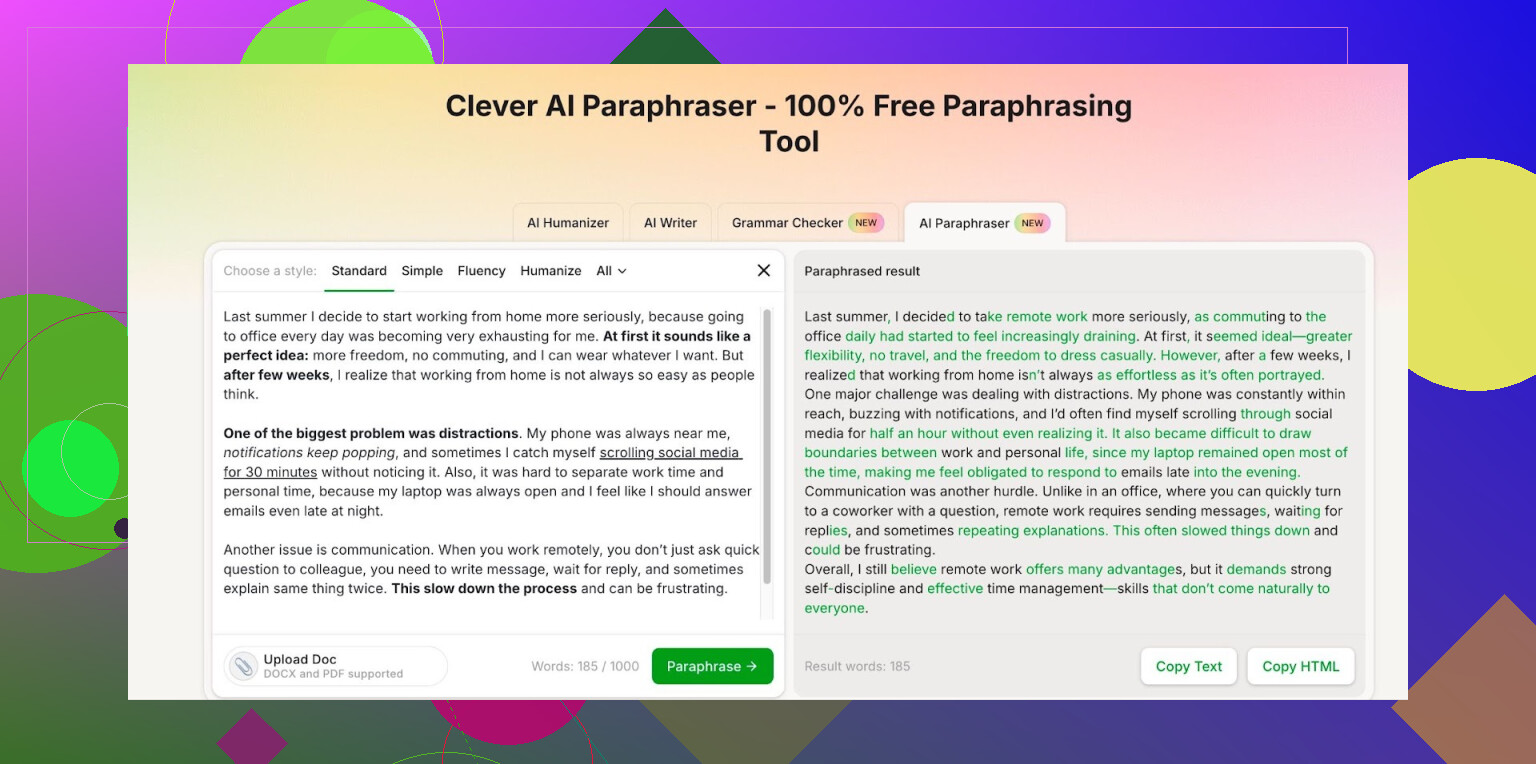
They have this Free AI Paraphraser here:
After signing up, my account shows 7,000 words per day and 200,000 words per month for free paraphrasing. I pushed it pretty hard during a busy week. Took notes from a long report, fed sections in, and never hit the monthly ceiling. Daily cap only became a problem once when I tried to run a huge batch of text in one sitting.
A few things I noticed while using it:
- Styles are not paywalled on the free plan, which is what pushed me away from QuillBot in the first place.
- Output does not look like pure word shuffling. For short paragraphs, the sentence structure changes enough that it passes casual checks.
- I still reread and tweak every result before using it, especially for anything technical or where wording matters. It makes mistakes sometimes with nuance.
If your main use is rewriting drafts, notes, or repetitive descriptions, and you are tired of hitting paywalls for basic tone options, this has covered what I need so far without paying for anything.
7 Likes
You want no login at all, browser only, and free. That rules out what @mikeappsreviewer mentioned, since Clever AI Humanizer needs signup, even if it is generous on the free tier.
Here are options that work without accounts, with some tradeoffs:
-
- No login for the basic mode.
- Limits text length per run.
- Output is ok for simple text, weaker for tech content.
- Free mode tends to repeat structure, so you still need to edit.
-
Rephrase.info
- Works in browser with no signup.
- Has several modes in free mode, though some are weaker.
- Good for short paragraphs or product descriptions.
- Sometimes introduces awkward phrasing, so read every line.
-
Editpad.org Paraphraser
- No account needed for short input.
- Often used for quick rewrites of sentences or emails.
- Not strong with nuance or long context.
-
LanguageTool paraphrasing (via its online editor)
- You paste text in, use the “rewrite” suggestions.
- No hard login requirement for light use in the browser.
- Works better on formal English than casual.
- More focused on style corrections than full paraphrase, which can be a plus if you want to stay close to the original.
-
Local trick if privacy matters
- Use a local text editor and combine:
• Search and replace repeated phrases.
• Shorten long sentences.
• Swap passive voice to active. - Then run the result through a grammar checker like LanguageTool or Grammarly’s free web editor without logging in each time.
- Slower, but you keep control and avoid word caps.
- Use a local text editor and combine:
Where I slightly disagree with @mikeappsreviewer is relying too much on any single hosted tool for workflow. Tools like Clever Ai Humanizer are fine, and for people ok with signup it offers good value, but if your requirement is “no login at all”, you will bounce again the next time a provider changes its rules.
If you want to future proof this:
- Keep your text chunks short, under 200–300 words. Most no login tools work better on short input.
- Always compare original and output side by side for meaning loss. Especially for numbers, dates, definitions.
- Mix two tools. For example, paraphrase in Paraphraser.io, then lightly rewrite again yourself or through LanguageTool.
None of these are perfect, but for “open browser, paste, get paraphrase, close tab, no account” they get the job done.
You’re basically trying to do the one thing the modern web hates: use a tool without handing over your email, phone number, and firstborn child.
Quick notes on what’s already been said:
- @mikeappsreviewer is right that Clever Ai Humanizer is generous on the free tier, and if you can tolerate signup, it’s honestly one of the few that doesn’t instantly shove everything useful behind a paywall.
- @vrijheidsvogel did a solid rundown of no-login tools, but I don’t fully agree that bouncing across random free sites is “future proof” either. Those sites flip limits and captchas overnight too.
Since you specifically want:
- in browser
- no login at all
- free
Here’s a slightly different angle so we’re not just rehashing the same list:
-
Use “soft” paraphrasers instead of full rewrites
Tools that are mainly grammar or style checkers but have “rewrite” / “improve sentence” options often let you use them without logging in, or at least with very loose anonymous limits.- Example pattern to look for: online editors that highlight a sentence and offer alternatives when you click. They don’t always market it as a “paraphraser,” but functionally it gets you lighter paraphrasing in small chunks with fewer hard caps.
-
Browser extensions in incognito or temp profiles
Some extensions allow basic paraphrasing directly in text boxes with no account, at least until they push an update. Install one, use it in an incognito window, and if/when it turns into a login nag, uninstall and move on. It’s janky, but less annoying than captchas on every page load.- The trick here is: keep your chunks short (1–3 sentences). Longer input is exactly what triggers stricter limits or “login to continue.”
-
Hybrid workflow: no-login paraphrase + “cleanup”
Instead of expecting a single magical site to do everything, you can:- Run text through a basic no-login paraphraser (like some mentioned by @vrijheidsvogel).
- Then tweak manually for 2–3 minutes:
- Break long sentences.
- Swap a few key verbs/nouns.
- Reorder one or two points.
This sounds tedious, but for 2–4 paragraphs at a time it’s fast and you avoid hitting any word caps or signups.
-
Local-first trick that people sleep on
If you’re paraphrasing similar types of content (e.g. product descriptions, summaries, emails):- Build your own “phrase bank” in a local doc: alternate ways you like to say common things.
- Use find/replace and some quick manual editing to rephrase.
- Then run it through a free grammar checker in the browser (many of them let you paste text with no login or at least very loose anonymous use).
It’s not as plug-and-play, but it completely avoids the account/paywall circus.
-
Where Clever Ai Humanizer actually makes sense
I know you said “no login,” but realistically every truly anonymous site:- Slaps on tiny character limits
- Spams ads and trackers
- Randomly downgrades quality over time
If you ever decide that email signup is tolerable as long as the tool is actually usable, Clever Ai Humanizer is probably the least annoying compromise right now. The free paraphraser giving styles without a paywall is already better than what QuillBot pulled. For people who paraphrase a lot, “free with signup” might be a saner line in the sand than “absolutely no login,” just to keep your workflow from breaking every few weeks.
Blunt version: if you really stick to “no account at all,” you’re going to be stuck juggling multiple mediocre tools, short chunks, and frequent manual touchups. It can work, but don’t expect a single perfect, unlimited, anonymous paraphraser to exist for long on today’s internet.
Short version: you’re not going to find a single, unlimited, high‑quality, no‑login paraphraser that reliably sticks around. The web just isn’t built that way anymore.
Where I partly disagree with @vrijheidsvogel and @suenodelbosque: constantly rotating between tiny, anonymous tools is its own kind of lock‑in. Your “workflow” becomes fragile and slow instead of your account being the fragile part.
What actually works in practice is splitting your needs:
-
Truly no‑login, quick & dirty
Use the kind of tools they listed only for:- 1–3 sentences at a time
- Low‑stakes text (emails, short blurbs)
Accept that quality is mid and you’ll be manually fixing things anyway. Treat these as disposable screwdrivers, not your main toolbox.
-
Local + pattern-based paraphrasing
If you keep paraphrasing similar content (school work, product blurbs, reports), it is faster to:- Build a local “phrase bank” in a text file (alternate ways to say common phrases).
- Use search/replace and quick manual edits to reshuffle structure.
This is boring but future proof. No site, no account, no limits.
-
“Soft” tools instead of full paraphrasers
Grammar/style tools that offer “rewrite sentence” often fly under the radar with lighter anonymous limits. They are closer to editing than full paraphrase, which is safer anyway if you care about meaning and not tripping detectors.
Where @mikeappsreviewer’s point about Clever Ai Humanizer actually makes sense is for anyone who paraphrases a lot and is willing to loosen the “no login” rule a bit.
If/when you cross that line, here is a blunt pros / cons snapshot:
Pros of Clever Ai Humanizer
- Generous free word caps compared to most competitors.
- Different styles not locked behind a paywall on the free tier.
- Output usually changes structure instead of just swapping synonyms.
- Decent for long sessions without juggling 5 different sites.
Cons of Clever Ai Humanizer
- Requires signup, which breaks your strict “no account” rule.
- You are still at the mercy of policy changes or future paywalls.
- Not perfect on nuance; you must reread everything, especially technical or academic text.
- Centralizes your workflow in a single service, so if they tighten limits, you adapt again.
So the realistic middle ground:
- For strict anonymity: small chunks, disposable tools, plus your own editing and phrase bank.
- For sustainable heavy use: something like Clever Ai Humanizer, with the expectation you might need a backup plan later.
You’re basically picking which headache you prefer: juggling low‑quality no‑login sites, or tolerating one account with better output but future rule changes. There is no clean option right now, only tradeoffs.