I accidentally deleted photos from my Nikon camera before backing them up, including both JPEG and RAW images from an important shoot. I need help figuring out whether Nikon deleted photo recovery can restore both file types and what the safest recovery steps are to avoid overwriting the files.
Deleted Nikon photos, what I did first
If the photos were on a Nikon, this usually comes down to SD card recovery. I’ve dealt with this a few times, and the first move is boring but important.
Stop using the card. Right now.
Do not shoot more photos. Do not record video. Do not format it again. When files get deleted, the card often keeps the data sitting there until new stuff lands on top of it. Once it gets overwritten, you’re in worse shape.
The part I would check before installing anything
I’d look for another copy first.
If you already imported the files to your PC earlier, check there.
If SnapBridge was syncing, check your phone.
If you had any cloud upload running, check those folders too.
I’ve seen people spend an hour scanning a card and then find the images sitting in a dated import folder. Annoying, but better than losing them.
If there’s no backup
I’d start with recovery software.
Disk Drill is the easy one. It reads Nikon photo types like NEF, NRW, and JPEG. On Windows, it lets you recover up to 100 MB for free, which is enough to test the card and see if the files are coming back clean before paying for anything.
The recovery steps I’d follow
- Take the SD card out of the Nikon.
- Plug it into your computer with a card reader.
- Install Disk Drill on your computer, not on the SD card.
- Pick the SD card in the app.
- Hit Search for lost data.
- Use Universal Scan. For deleted camera photos, this is usually the right starting point.
- Wait for the scan to finish, then preview what it finds.
- If the preview opens and the image looks normal, your odds are decent.
- Recover the files to your computer or another drive. Do not save them back onto the same SD card.
That last part matters more than people think. Writing recovered files back to the same card is how you stomp on the rest of the recoverable data. I did this once years ago. Dumb mistake. Lost more than I had to.
If video files are missing too
Run Advanced Camera Recovery after the normal scan.
This matters more for video than photos. Camera video files get fragmented, and a plain scan sometimes misses pieces or skips the clip entirely. I’ve had standard recovery find the JPEGs and NEFs, then choke on the MOV or MP4 files until I used the camera-focused scan.
If you want a free route
PhotoRec is the usual answer.
It works. I’ve used it. But it’s rough around the edges.
There’s no preview, which slows things down.
Recovered files often come back with generic names.
Sorting the output takes time, esp if the card had old junk on it too.
So yes, free, but not pleasant if you want something simple.
When I’d stop and not mess with it
If the card doesn’t show up in your computer at all, or it has physical damage, I would quit tinkering.
At that point, a recovery lab has the better shot. Every random retry, reinsert, or format attempt eats into your odds. Bent card, cracked shell, reader errors, card asking to be formatted, all bad signs.
My short version
Deleted Nikon photos are often recoverable if you move fast and stop writing to the SD card.
Best order:
- Stop using the card.
- Check for existing copies.
- Scan it with Disk Drill.
- Save recovered files somewhere else.
- Use Advanced Camera Recovery if video is involved.
- Switch to a pro service if the card is unreadable or damaged.
If the deletion happened recently, your chances are usuallly decent. Timing matters a lot here.
3 Likes
Yes. If the data has not been overwritten, Nikon deleted photo recovery works for both JPEG and RAW files, including NEF and sometimes NRW, depending on the camera model.
One small point where I differ from @mikeappsreviewer. File type is usually not the hard part. Card condition matters more. If your SD card still mounts fine, recovery odds for JPEG and RAW are often similar. RAW files are larger, so if you kept shooting after deletion, they are at higher risk of partial overwrite. Thas the main issue.
A few practical checks:
- Look at the card size and shoot count after the deletion.
- If you took even 20 to 50 new RAW shots, older deleted RAWs may be damaged first.
- If only a few JPEGs were shot after, recovery chances stay better.
Also, some recovered RAW files come back intact but lose the original filename or folder structure. The image data is what matters. Nikon apps might not sort them neatly after recovery, so test the recovered NEF files in Lightroom, Capture NX Studio, or even Windows thumbnail view.
If you want the best Nikon SD card recovery software for JPEG and RAW photo restore, Disk Drill is a solid pick because it detects common Nikon formats and lets you preview results before recovery. Preview matters. A thumbnail opening for a JPEG is a good sign. A RAW preview or valid file size is what I’d check for NEF.
Save anything recovered to your computer, not back to the card. Obvious, but ppl still do it.
Also, if you want a quick visual explainer, this Nikon photo recovery walkthrough is worth a look.
Short answer, yes, both JPEG and RAW are recoverable. The real question is how much was written to the card after deletion.

Yes, usually both can be restored. Nikon cameras don’t really make JPEG vs RAW a special case here. If the files were deleted from the SD card and the card has not been heavily reused, recovery software can often pull back both JPEG and NEF files.
I mostly agree with @mikeappsreviewer and @nachtdromer, but I’d push back on one thing: people focus a little too much on file format. The bigger issue is whether the camera kept writing to the card after the deletion. A deleted JPEG and a deleted RAW are both recoverable in theory, but a large RAW gets corrupted more easily if even part of it was overwritten. That’s where things go sideways fast.
Another thing people forget: if you deleted the photos in-camera, some Nikon bodies also update the card database and folder structure in ways that make the recovered files come back messy. So don’t panic if filenames are gone or if the folder tree looks wrecked. If the NEF opens, that’s the win.
If you want the simple route, Disk Drill is probly the most user-friendly Nikon deleted photo recovery option for this. It’s decent at finding JPEG, NEF, and other camera file types without making you babysit a command line for an hour. I’d also recover to your computer first, then sort the files later.
One more thought that hasn’t been said enough: if the card is acting flaky, make a byte-for-byte image of it before scanning. Recovery from the image is safer than hammering the actual SD card over and over. That matters if the card has read errors or keeps disconnecting.
For extra reading, this thread on how to recover deleted photos from an SD card safely is worth checking.
Short version: yes, Nikon deleted photo recovery can restore both JPEG and RAW images. The real decider is card activity after deletion, not the Nikon branding or the file type alone.
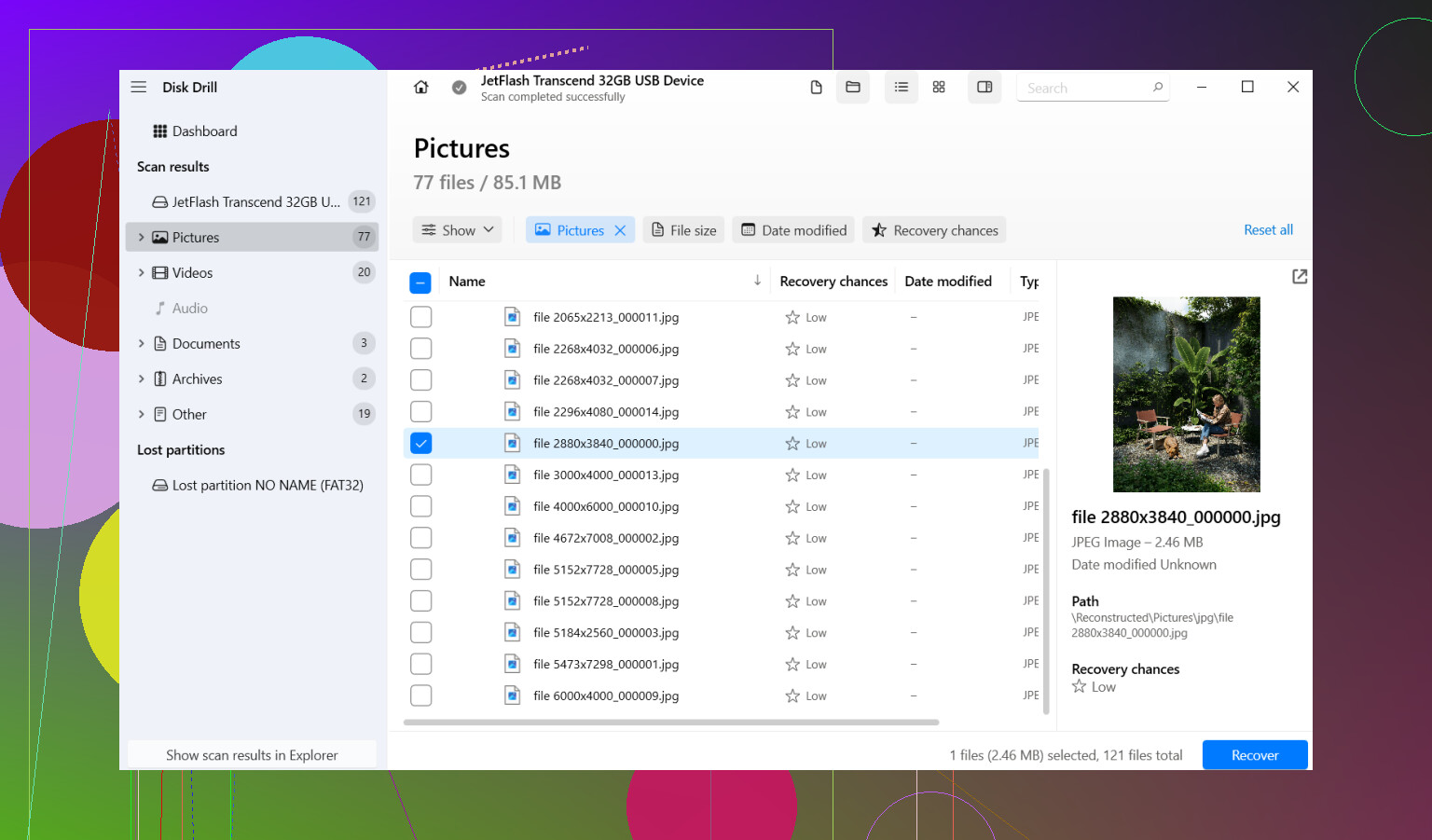
Yes, both usually come back, JPEG and Nikon RAW like NEF, sometimes NRW too. I agree with @nachtdromer and @techchizkid that overwrite risk is the real problem, not the format itself. Slight disagreement with @mikeappsreviewer on one practical point: preview is helpful, but a missing RAW preview does not always mean the file is bad. Some apps just handle NEF previews poorly.
One thing I’d add: check whether the camera used dual slots, overflow, or backup recording. A lot of people forget they may still have copies on card 2.
About Disk Drill:
Pros:
- easy to scan camera cards
- recognizes JPEG and Nikon RAW well
- preview helps with quick triage
- decent for non-technical users
Cons:
- free recovery is limited on Windows
- scan results can look cluttered on heavily used cards
- RAW metadata and filenames may not return cleanly
So yes, Nikon deleted photo recovery can restore both. Just don’t judge success only by folder names or thumbnails. If the recovered NEF opens in editing software, that’s the real test.