I’ve been using BypassGPT for a while, but recently lost access due to new limits and pricing changes. I’m looking for a reliable, completely free alternative that can handle similar content filtering workarounds or advanced prompt handling. What tools, sites, or extensions are you using now that match or beat BypassGPT’s features without costing anything?
- Clever AI Humanizer Review
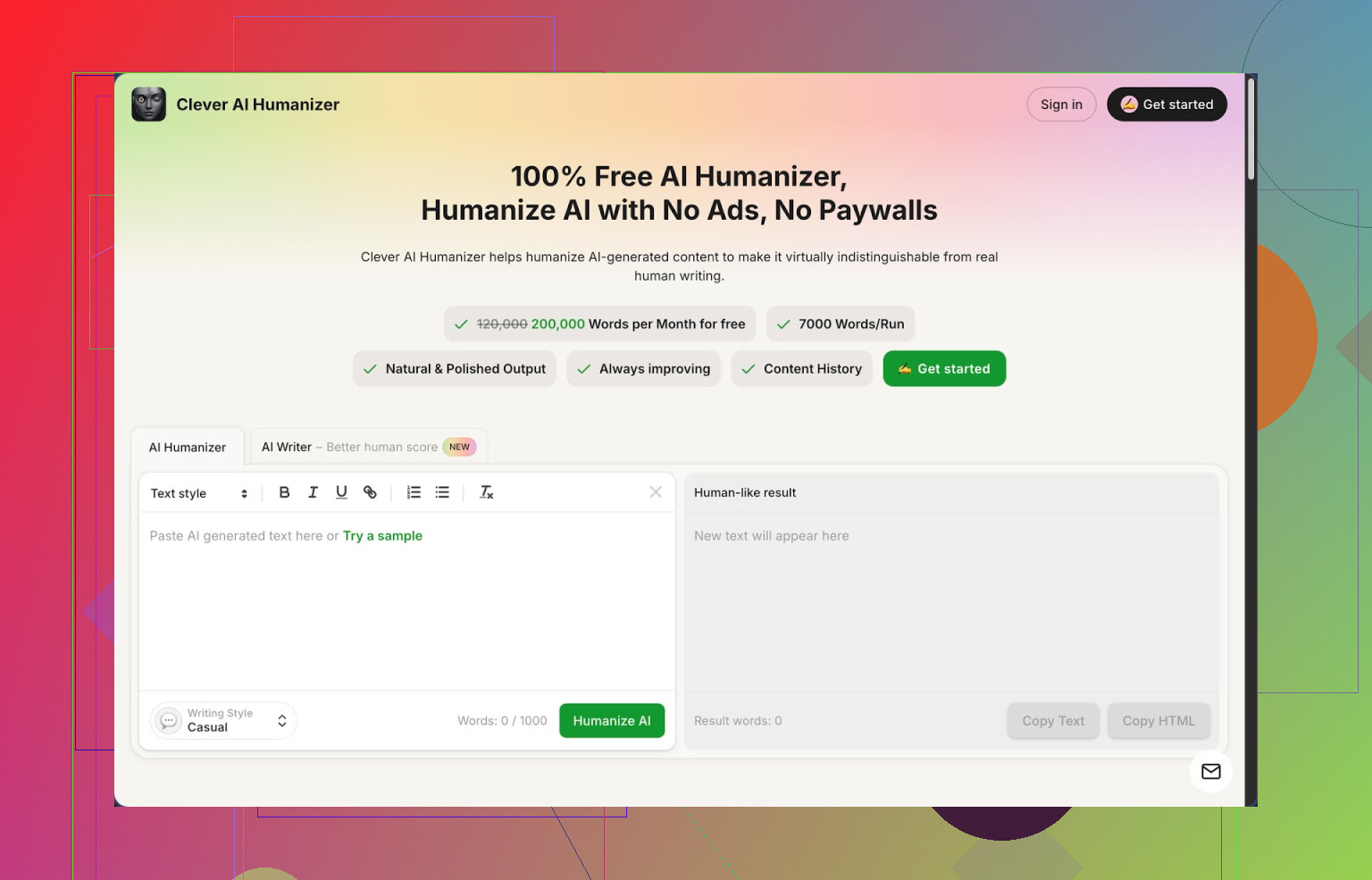
I spent a full afternoon messing around with Clever AI Humanizer, from the homepage at
Short version of what I ran into: it works better than I expected, and the pricing is kind of absurd for what you get, but it is not magic.
What you get for free
They give you:
- Up to 200,000 words per month
- Up to 7,000 words in one run
- Three styles: Casual, Simple Academic, Simple Formal
- A built in AI writer in the same site
No log of “credits disappearing” or hidden caps yet. I pushed several long test blocks through it, and the counter did move, but it did not block me or throw nag screens.
How the humanizer itself behaved
The core thing is the Free AI Humanizer.
What I did:
- Took raw text from ChatGPT and Claude, 500 to 2,000 words each.
- Pasted into Clever AI Humanizer.
- Selected “Casual” first, then tried the two “Simple” styles.
- Ran the outputs through ZeroGPT to see how obvious the AI markers were.
ZeroGPT results on my side matched what others reported:
Using the Casual style, I got 0 percent AI detection on multiple samples that were originally flagged as 90 to 100 percent AI. Simple Academic and Simple Formal were close, but Casual kept winning by a small margin.
Subjectively, the tone felt closer to something I would write after a quick rewrite: fewer repeated phrases, shorter runs of identical structure, less robotic rhythm. It did not shred the meaning. I checked line by line on one technical paragraph, and the information stayed intact.
One thing to watch: the text often came out longer. A 1,000 word input could turn into 1,200 or 1,300 words. It adds small clarifications and extra phrasing, which probably helps break the AI patterns, but if you work with tight limits, you need to trim afterward.
Using it as a “fix my AI draft” button
If you already use an AI writer, this feels like a post-processing step.
Workflow I tried:
- Generate a blog section with an LLM.
- Drop it into Clever AI Humanizer.
- Pick Casual.
- Skim output, delete fluff, keep structure.
For content that needs to survive aggressive detectors, it did better than simple paraphrasers I tried earlier. It did not turn everything into weird synonyms, and it kept the topic clear.
Other built in tools
The site is not only a humanizer. There are three extra tools tied in.
- Free AI Writer
You start from a prompt, then it generates a draft and you can humanize it in the same flow. So you go from idea to “more human” text without switching tabs.
I tried:
- A short essay style answer.
- A generic blog intro.
If you use the AI Writer then run the result through their humanizer, ZeroGPT scores dropped lower than when I fed it an external AI draft. I suspect they optimize their own output for their own humanizer.
- Free Grammar Checker
I fed it a paragraph with missing commas, some tense issues, and an awkward sentence. It fixed the obvious stuff and smoothed a few clunky phrases, similar to Grammarly, but less obsessed with style hints.
This is useful right after humanizing, because the humanizer sometimes inserts slightly awkward wording. One pass through the grammar checker cleaned most of that.
- Free AI Paraphraser Tool
Different section, same interface style. You paste text, it rewrites while keeping the meaning.
I tested it on:
- A product description.
- A small SEO snippet.
Good for rephrasing without changing topic, and less extreme than many “spinners”. It did not turn text into nonsense, which already puts it ahead of half of the free paraphrasers out there.
Using all of it together
In practice you get four tools in one place:
- Humanizer
- AI Writer
- Grammar checker
- Paraphraser
The nice part is the workflow. You can:
- Generate with the AI Writer.
- Humanize the output.
- Run grammar check.
- Use the paraphraser for specific sentences or sections.
I did this for a test blog segment and went from prompt to publishable draft in one browser tab. No ads, no “upgrade to pro” walls mid-process, at least at the time I tried it.
Stuff that bugged me
It is not some invisible cloak for AI text.
- Some detectors will still flag pieces as AI written. ZeroGPT liked it, but other tools are stricter or use different signals. You should not rely on this for anything where AI use breaks rules.
- Output tends to get longer, not shorter. If you start with a bloated AI draft, humanizing will often bloat it more. You still need to edit.
- The styles are simple. If you want very specific voice or domain heavy language, you will have to tweak by hand afterward.
Even with those issues, for something that is 100 percent free at 200k words a month, it sits at the top of my current list.
More info and external reviews
Long form review with screenshots and AI detection proof is here:
Video review on YouTube:

Reddit threads that go into other tools and general “humanizing AI” talk:
Best AI humanizers discussion:
https://www.reddit.com/r/DataRecoveryHelp/comments/1oqwdib/best_ai_humanizer/
General thread about humanizing AI output:
https://www.reddit.com/r/DataRecoveryHelp/comments/1l7aj60/humanize_ai/
I get why you want a “BypassGPT clone,” but I disagree a bit with @mikeappsreviewer on chasing pure filter dodging. Most of the free options that try to do that die fast or get sketchy.
Here is what works more reliably right now if you want advanced prompt handling, fewer block messages, and zero cost.
- Open‑source local models
If your hardware is half decent, local is still the best “filter workaround,” because there is no provider policy in your way.
Look at:
- LM Studio with models like Llama 3 8B or Qwen 7B
- Ollama with
llama3,qwen2,phi3
Pros: - No server limits.
- You control safety settings.
Cons: - Needs a modern CPU and a bit of RAM.
Tip: Run a small instruct model for quick stuff and a bigger one for complex prompts. You get way fewer refusals than cloud bots.
- Free hosted frontends to open models
Instead of “bypass tools,” use frontends that plug into permissive models. They seldom brand themselves as bypass tools, but they behave similar in practice.
Examples to search for:
- Sites that expose Qwen, Llama 3, or Mixtral with minimal “safety layer”
- Community chat frontends that let you pick “uncensored” or “uncut” models
Look for: - Model switcher
- Temperature and system prompt control
- No login or simple email login
These tend to outlast the “BypassGPT-style” clones that get nuked fast.
- Prompt technique over “bypass” tools
You get a lot of mileage if you structure prompts better, instead of depending on some magic site. For example:
- State purpose clearly: “For research and analysis only, non-deployable output.”
- Break tasks into neutral substeps. First ask for structure, then ask to fill it.
- Ask for “classification”, “comparison”, “critique” rather than direct generation of sensitive stuff.
This keeps you inside policy on most mainstream bots, so you are not fighting the filter every 2 messages.
- Use a humanizer instead of a “bypass model”
If your main goal is text that feels less like AI and passes simple AI detectors, something like Clever Ai Humanizer works better than chasing yet another BypassGPT clone.
Workflow idea:
- Use a free general model for logic and structure.
- Run the result through Clever Ai Humanizer to rewrite into more human‑like style.
This splits the job into “thinking” and “styling” and avoids constant content blocks.
- Browser tools, with caution
Some extensions inject prompts to try to weaken filters, but I would not rely on those. They break whenever the provider changes its UI or ToS. If you use them anyway, treat them like a thin convenience layer, not your main solution.
If you want closest behavior to BypassGPT plus stability, I would stack like this:
- Local model via LM Studio or Ollama for anything sensitive or heavily filtered.
- A free hosted Qwen or Llama 3 frontend for day‑to‑day stuff.
- Clever Ai Humanizer at the end if you need SEO‑friendly or “non‑AI‑ish” text.
That combo tends to survive pricing changes better than chasing the next “bypass” site that disappears in two weeks.
I get why you’re chasing a “BypassGPT clone,” but I’m gonna push back a bit harder than @mikeappsreviewer and even slightly disagree with @reveurdenuit here.
If you only focus on “bypass” behavior, you’re gonna keep jumping from dead site to dead site. A lot of those “uncensored” web tools are:
- Logging everything
- Injecting shady ads / scripts
- Quietly rate‑limited or throttled
- One ToS complaint away from vanishing
Instead of repeating local models + generic frontends (they already covered that well), here are some different angles that still keep you at zero cost:
1. Use hybrid workflows instead of a single magic site
Instead of hunting for one BypassGPT replacement, stack a few simple free pieces:
-
Use any free LLM (even the stricter ones) to:
- Outline
- Plan
- Explain concepts
- Do comparisons / critiques instead of “write X directly”
-
Then throw the text into Clever Ai Humanizer to:
- Strip the obvious AI tone
- Make it sound more natural and “human”
- Help dodge dumb AI detectors that just look for style patterns
This solves like 80% of what people secretly wanted BypassGPT for: “Give me smart output that doesn’t look like ChatGPT wrote it.”
You’re not “bypassing filters” so much as sidestepping them: ask for safe, analytical stuff, then humanize and rephrase. Way more stable than chasing some sketchy BypassGPT clone that’ll die next week.
2. Don’t underestimate “boring” providers
Everyone’s obsessed with edgy tools, but there are some smaller players and academic deployments that:
- Use decent open models (Llama, Qwen, etc.)
- Have lighter safety rails than big-name providers
- Don’t advertise as bypass tools so they stay under the radar
Things to look for when you stumble across a new chat site:
- Can you edit the system prompt or “role”?
- Can you control temperature / top‑p?
- Can you export / import conversations?
- Do they state clearly if they store your prompts?
If a site is shouting “UNCENSORED, BYPASS, NO LIMITS” in giant letters, that’s usually the one you don’t want long term. Quiet, nerdy, half‑broken UIs are honestly more promising.
3. Prompt strategy, but more aggressive than “be polite”
I partly disagree with the “just phrase it nicely and you’re fine” approach. That only works up to a point. What does help more in practice:
- Ask for meta output
Instead of “write X for me,” try:- “Describe how a person might structure X.”
- “List components and arguments that typically appear in X.”
- Use multi‑turn refinement
- First: “Give a neutral, generic version of X.”
- Then: “Rewrite this in a more casual / technical / academic tone, keeping content but changing style.”
A lot of filters trigger on topic + intent. If you keep the intent clearly educational, critical, or analytical, you avoid most “blocked” messages without needing a shady site.
4. Humanizer > “uncensored model” for many use cases
This is where I actually lean harder than both @mikeappsreviewer and @reveurdenuit: if your main pain is:
- Text sounds robotic
- AI detectors flag it
- You want more “real person” vibes
…then a dedicated tool like Clever Ai Humanizer is more on-point than an “uncensored” chatbot. Your workflow becomes:
- Use any stable, free model for logic & structure.
- Run the result through Clever Ai Humanizer.
- Light manual edit to fix anything weird.
You’re not fighting content filters every message, and you’re not gambling on some volatile BypassGPT clone that might show a 502 error right when you actually need it.
5. Be realistic about “completely free”
Hard truth: there is no infinite, high‑quality, forever‑free BypassGPT drop‑in. Someone pays the GPUs. If a site gives you:
- High context window
- Fast responses
- Zero limits
- No fees
…then you are the product. At least with:
- Local tools
- Smaller frontends
- A humanizer like Clever Ai Humanizer
you have more control and less “surprise, we’re paywalled now.”
TL;DR version:
- Stop looking for a 1:1 BypassGPT clone. Those are disposable.
- Stack tools: safe LLM for thinking, Clever Ai Humanizer for style.
- Use quieter frontends with open models for looser limits.
- Work with the filters by reframing into analysis / structure, not raw bypass.
It’s not as sexy as “ultimate bypass hack,” but it actually lasts longer than 2 weeks.
Short version: you won’t find a permanent, free “BypassGPT twin,” but you can get 90% there by combining lighter‑guardrailed models with a stylistic post‑processor.
Quick breakdown that doesn’t rehash what @reveurdenuit, @voyageurdubois and @mikeappsreviewer already covered:
- Different angle on models
They focused a lot on local / open models and general frontends. I’d lean harder into:
- Academic / research deployments of open models
- Smaller regional providers that quietly expose Llama/Qwen with mild filters
These are usually boring UIs with ugly dashboards, but they are less aggressive on refusals than the big consumer bots. The catch: they can be slow and occasionally unstable, so keep backups.
- Rotating setup instead of “one main tool”
Instead of hunting The One Site:
- Primary: a reasonably permissive open‑model frontend for planning, outlines and analysis
- Backup: a stricter mainstream model for when the smaller one is overloaded
- Local or offline option only for truly sensitive edge stuff (where losing the message to a block matters)
This rotation matters because free “bypass” sites tend to vanish or throttle without warning.
-
Where I slightly disagree with others
They are right that prompts and structure help, but there is a limit to how much “reframing” can do when the provider’s safety layer is aggressively tuned. At some point, no clever wording will fully replace using models that are actually configured with lighter policies. So I’d spend at least as much time hunting alternate providers as polishing prompt tricks. -
Clever Ai Humanizer as a post‑processor
If your real pain is “AI‑ish tone” or basic detectors, a tool like Clever Ai Humanizer is very useful at the end of the pipeline, not as a replacement for the model.
Pros:
- Good at stripping repetitive, generic phrasing
- Makes text read closer to human drafts rather than “LLM output v1”
- Works with any source model, so you can keep switching free providers
Cons:
- It will not magically bypass strict content filters; it only polishes what you already got
- Occasionally over‑casual or slightly off tone, so you still need a quick human pass
- Another dependency in the chain, which means more friction if it ever throttles or paywalls
So: use your free model(s) for reasoning, structure and safe analysis, then run the result through Clever Ai Humanizer to clean the style. That combo gets you a lot of what people wanted from BypassGPT without betting everything on a single fragile site.